AfricanFalls
📅 Published: 2026-04-22 20:33 | 🔄 Last Updated: 2026-05-14 22:44
https://cyberdefenders.org/blueteam-ctf-challenges/africanfalls/
Q1 What is the MD5 hash value of the suspect disk?
Whenever the evidence is collected using disk acquisition tools, a log file is typically generated alongside with it. By extracting the lab file, i found a file named DiskDrigger.ad1.txt which holds the MD5 hash information.

9471e69c95d8909ae60ddff30d50ffa1
Q2 What phrase did the suspect search for on 2021-04-29 18:17:38 UTC? (three words, two spaces in between)
This question requires some browser forensics investigation skills.
Loading the evidence file into FTK imager and inspecting the users folders reveals that there is only one user on this machine: John Doe.

I then searched for the browser that’s on the machine, identifying Google Chrome and Brave

The Chrome history file is stored at Users\John Doe\AppData \ Local \ Google \ Chrome \ User Data \ Default \ History (the similar path applies to Brave - a chromium-based web browser) . And by utilizing BrowsingHistoryView (Nirsoft) to read the history file, we can retrieve the answer

password cracking lists
I also applied the similar method with Brave:
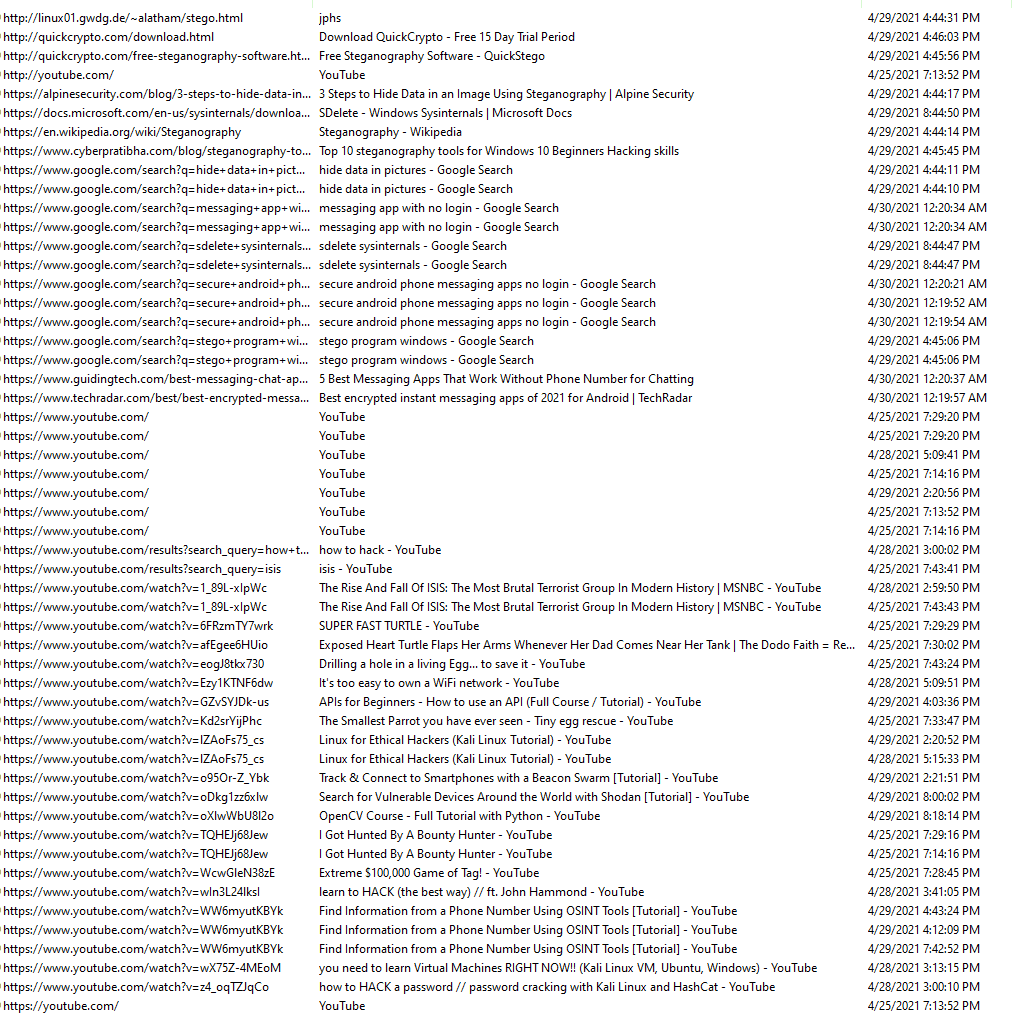
It appears the user was researching how to crack passwords using Hashcat and how to use SDelete (a Sysinternals tool).
Q3 What is the IPv4 address of the FTP server the suspect connected to?
From previous question, we also found that Filezilla is install on the host.
Filezilla is a free, open-source, and cross-platform File Transfer Protocol (FTP) client used to transfer files between a local computer and a remote web server.
By reviewing the FileZilla configuration file: filezilla.xml

We get the answer:
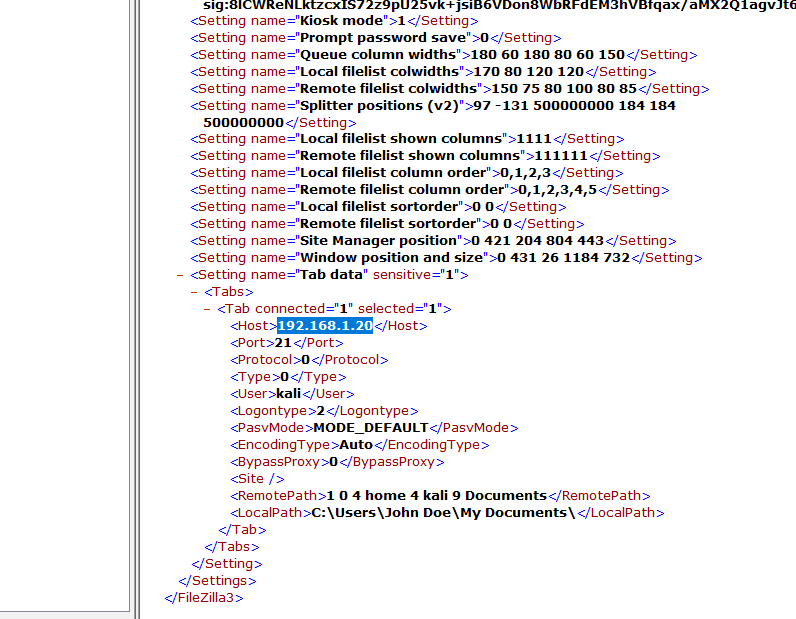
192.168.1.20
Q4 What date and time was a password list deleted in UTC? (YYYY-MM-DD HH:MM:SS UTC)
When a file is deleted, Windows splits it into two separate components:
- The
$Istands for Information. This file holds the metadata about the deleted file.- Original File Size: How big the file was before it was deleted.
- Deletion Timestamp: The exact date and time the user deleted the file (stored in UTC format).
- Original File Path: The exact location where the file used to live on the hard drive (e.g.,
C:\Users\John\Documents\report.docx).
- The
$Rstands for Recovery or Raw Data. This file holds the actual content of the file you deleted.

By looking at the $I file, the answer must be:
2021-04-29 18:22
Q5 How many times was Tor Browser ran on the suspect's computer? (number only)
To find evidence of execution, the most reliable artifact is prefetch which resides in C:\Windows\Prefetch
For this question i used WinPrefetchView (also bt NirSoft):
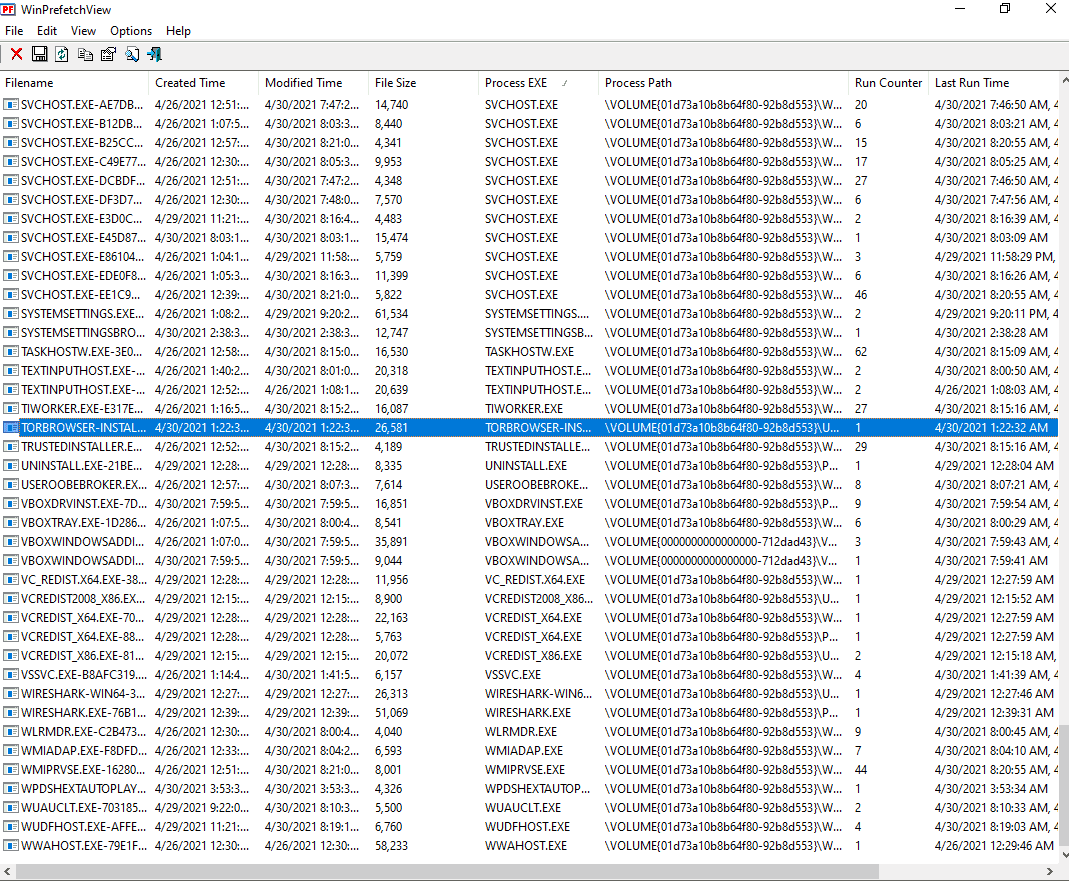
I found evidence of the installer, but no sign of the Tor browser actually being executed. Therefore, the answer should be:
0
Q6 What is the suspect's email address?
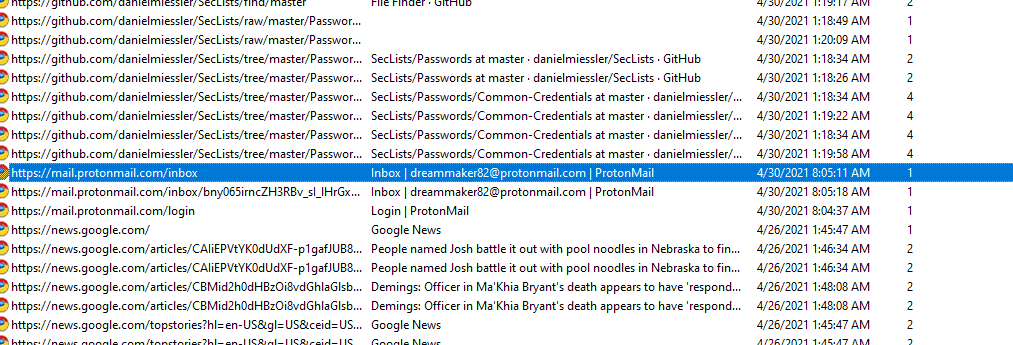
Scrolling through John Doe's browsing history again reveals access to a ProtonMail inbox:
Q7 What is the FQDN did the suspect port scan?
ConsoleHost_history.txt is a legitimate, default PowerShell file that acts as a log, storing up to 4,096 of the most recently executed commands for user convenience.
Path: C:\Users\<Username>\AppData\Roaming\Microsoft\Windows\PowerShell\PSReadLine\ConsoleHost_history.txt
Forensic significance: It allows investigators to determine exactly what commands the user or attacker executed in PowerShell.
bettercap
bettercap --check-updates
bettercap -S
bettercap -X --no-spoofing
bettercap -version
bettercap -eval "caplets.update; ui.update; q"
bettercap -caplet http-ui
ipconfig
nmap -Sp 10.0.2.15
nmap -Sp 10.0.2.1-254
nmap -sP 10.0.2.1-254
ping 10.0.2.2.
ping 10.0.2.2
exit
sdelete
ipconfig
ipconfig /cleardns
ipconfig /flushdns
exit
sdelete
exit
ipconfig /flushdns
ping dfir.science
nmap dfir.science
dir
cd .\Documents\
dir
sdelete .\accountNum
sdelete .\accountNum.zip
exit
cd E:\FTK_Imager_Lite_3.1.1
& '.\FTK Imager.exe'
exit
dfir.science
Q8 What country was picture "20210429_152043.jpg" allegedly taken in?
Using ExifTool with the -a flag to extract the image metadata.
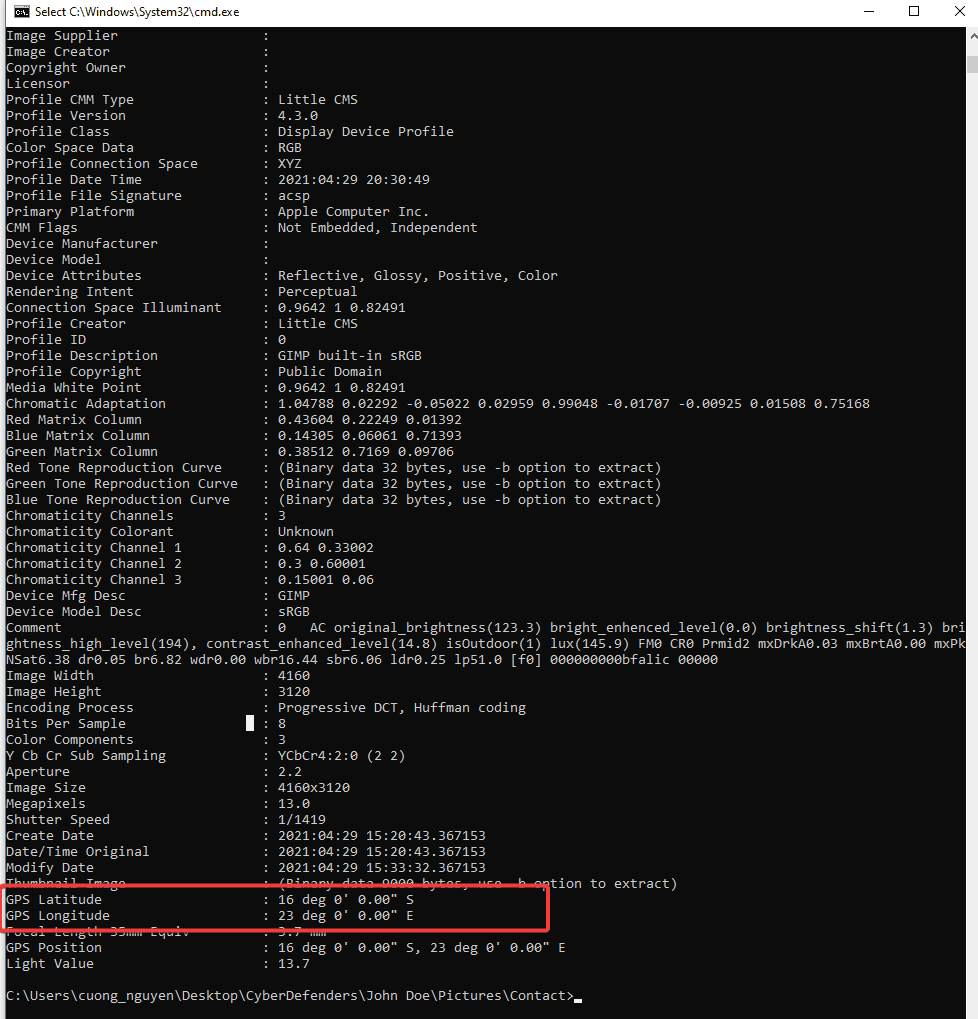
Search for the GPS coordinates results in:
Zambia
Q9 What is the parent folder name picture "20210429_151535.jpg" was in before the suspect copy it to "contact" folder on his desktop?
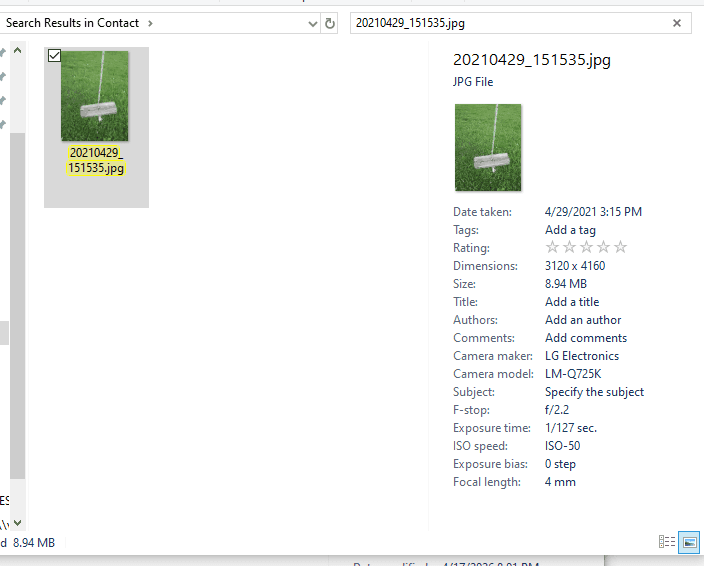
I searched on google for the device model:

It’s the LG Q7 - a smartphone. The image was captured on the phone and then imported to the PC. To confirm the origin folder, i used shellbags explorer
Shellbags indicates the folder that the user had interacted with. So every folder the user touched, is stored in shellbags. There are 2 types of shellbags based on type of folder being accessed:
NTUSER.dat: tracks interactions with network locations, mapped network drives, and sometimes folders located directly on the user's Desktop.USRCLASS.dat: records interactions with the local file system and removable media.
USRCLASS proves to be more useful in this case
Using ShellBags Explorer, we can see the interaction time alligns perfectly with our hypothesis
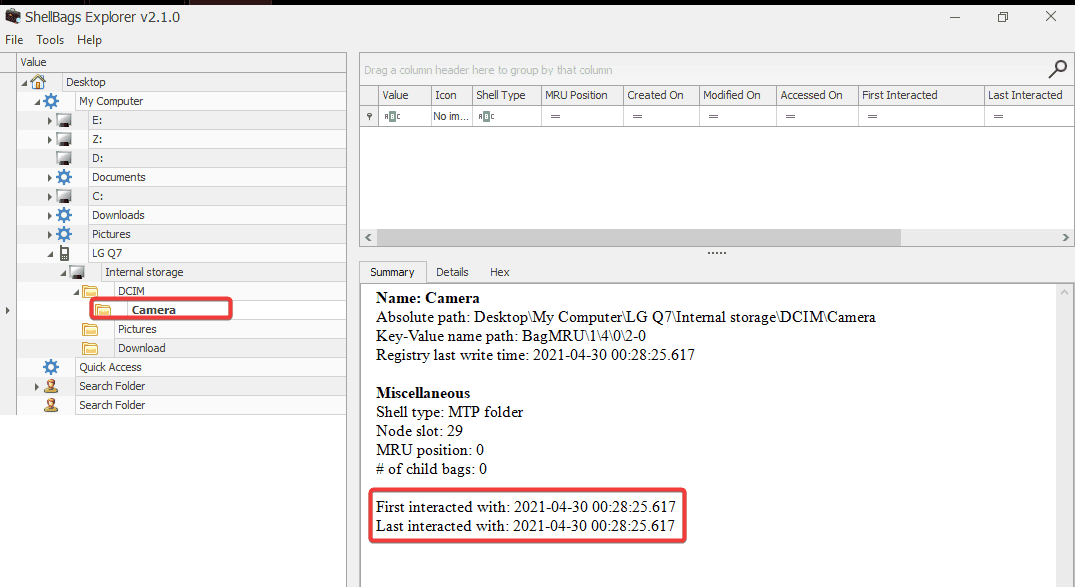
So the answer should be:
Camera
Q10 A Windows password hashes for an account are below. What is the user's password?Anon:1001:aad3b435b51404eeaad3b435b51404ee:3DE1A36F6DDB8E036DFD75E8E20C4AF4:::
NTLM hashes are not salted. Therefore, a rainbow table attack can be used. To recover the password, you can use any online hash decryption website, such as hashes.com.
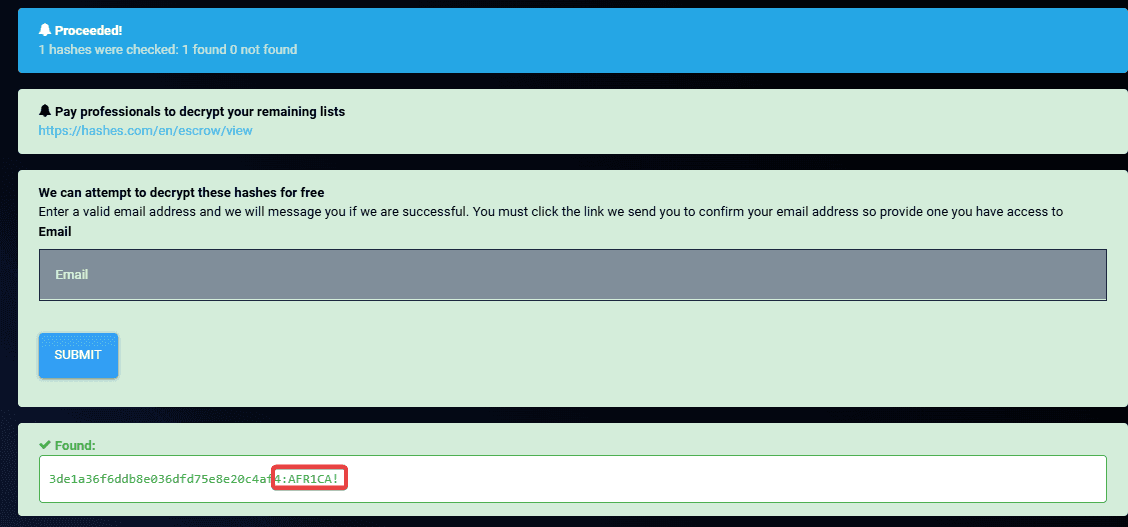
AFR1CA!
Q11 What is the user "John Doe's" Windows login password?
I used mimikatz to extract the NTLM hash from SAM hive:
mimikatz # lsadump::sam /system:C:\Users\cuong_nguyen\Desktop\CyberDefender\[root]\Windows\System32\config\SYSTEM /sam:C:\Users\cuong_nguyen\Desktop\CyberDefender [root]\Windows\System32\config\SAM
RID : 000003e9 (1001) User : John Doe Hash NTLM: ecf53750b76cc9a62057ca85ff4c850e
And navigated to hashes.com to decrypt the hash:

ctf2021